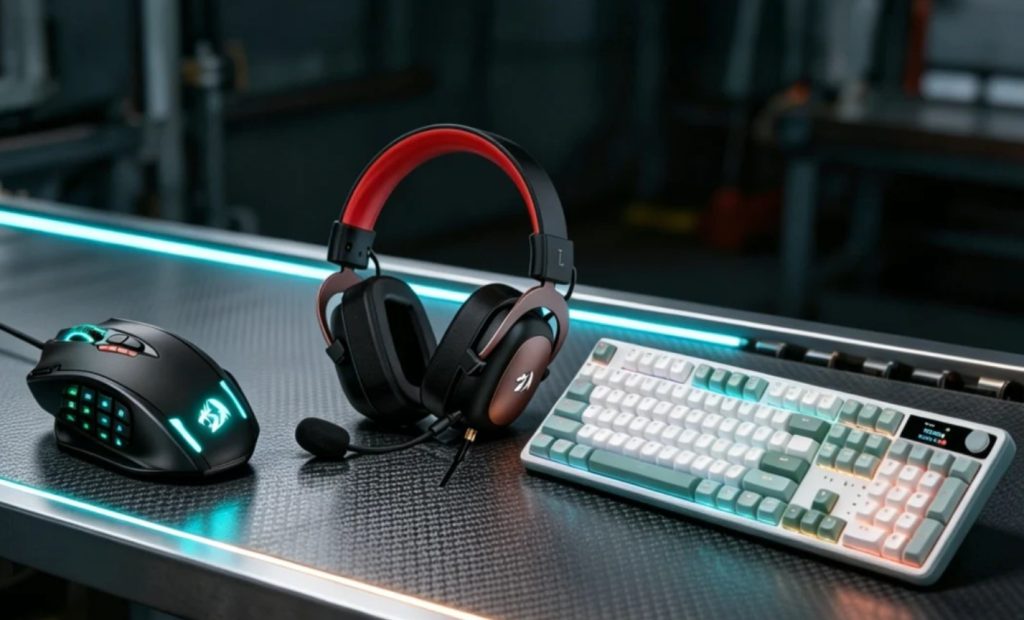

Quick answer: Redragon is good at the parts your hands touch and weak at the parts that light up, and once you know that the buying decision is simple. The M908 MMO mouse ($29.99) gives you twelve side buttons and a macro engine for a quarter of Naga money — 11,842 ratings, one owner on his second after four years, and a middle click that is the part to watch. The K686 HE ($49.99) is the cheapest route into hall-effect switches, and two owners report the LEDs dying months in while the switches stay perfect. The K719 PRO ($64.99) has the best rating here (4.6 over 846) and the dimmest backlight — check every key on day one.
The three-product lineup
One mouse, two keyboards. Prices are feed values at time of writing.
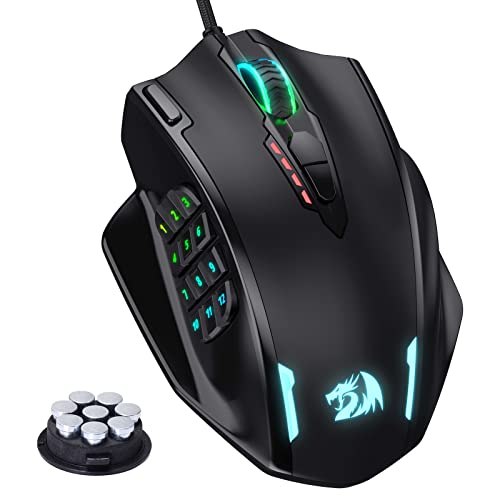
Redragon M908 MMO mouse
Twelve side buttons and a macro engine for $29.99, which is the entire argument and roughly a quarter of what a comparable Razer Naga costs. The review pool is unusually useful because it is full of Naga refugees who list what they gave up. Comfort is rated equal or better, the scroll wheel is singled out, and one five-star buyer is on his second unit after four years on the first. The documented failures are the ones you would expect at this price: one one-star’s middle button died, another four-star says the top finish wears through in a few months, and more than one owner says twelve buttons in that space means hitting the wrong one.
- 12 buttons at $29.99 — the price argument against Naga is roughly 4 to 1
- middle click can die — one one-star’s specific failure; the part most owners use daily
- top finish wears — a four-star reports the coating going in a few months
- buttons are crowded — an owner with large hands wants six, not twelve
- software is basic but works — repeatedly described that way — no cloud, no accounts

Redragon K686 HE wired hall-effect keyboard
The cheapest hall-effect board in this lineup and the one that gets the technical praise. Magnetic switches mean adjustable actuation and rapid trigger — you can set how far the key must travel and how fast it resets — which is the thing competitive players pay for. One owner who came from a keyboard costing four times as much says the difference in play is not worth the money. Two documented quirks: the RGB is the failure point, with owners reporting sections flickering and dying over months, and the software is served both as a download and a browser version where profile import/export is limited.
- hall-effect at $49.99 — adjustable actuation and rapid trigger, the cheapest route into it
- RGB fails before the switches — two owners describe LEDs flickering and dying, keys fine
- wired only — unlike the wireless boards here, this one is a cable
- browser software limits profiles — one owner says the web version cannot import or export

Redragon K719 PRO wireless 95-key gasket keyboard
95 keys, a gasket mount, a small TFT screen and a volume knob, wireless, for $64.99 — and the highest rating in this article at 4.6 over 846 ratings. The positive reviews are about typing feel and sound rather than features: mint switches are described as a low thud instead of a click, and multiple buyers say they can type faster on it than on a membrane board. The negative reviews are concentrated and specific: the screen arrives scratched, the display can show the wrong date with no fix, the RGB is dim to the point of being decorative, and two owners received boards with dead keys out of the box.
- best-rated board here — 4.6 over 846 ratings, driven by typing feel rather than features
- RGB is decorative — an owner measured full brightness and still calls it barely visible
- TFT date can be wrong — one owner cannot correct it; another received a scratched screen
- dead keys out of the box — two separate reports; check every key in the first hour
Buy the chassis you touch, ignore the lighting
All three of these are good value in the parts you touch — switches, shell, scroll wheel — and weak in the parts that light up. That is the whole decision.
You play MMO and want twelve buttons — M908 ($29.99)
11,842 ratings, a macro engine, and a Naga-shaped body at a quarter of the price. One owner is on his second after four years on the first. The middle click is the part that dies.
You want hall-effect without paying for it — K686 HE ($49.99)
Adjustable actuation and rapid trigger, wired, $49.99. Two owners report the LEDs failing months in while the switches stay perfect. Buy it for the switches and leave the lighting off.
You type all day and want it quiet — K719 PRO ($64.99)
95 keys, gasket mount, mint switches described as a low thud, TFT screen and knob. 4.6 over 846 ratings — the best average here. Check every key and the date on day one.
Side by side
Prices, ratings and rating counts from the brand’s affiliate feed at time of writing.
| M908 mouse | K686 HE | K719 PRO | |
|---|---|---|---|
| Price | $29.99 (was $32.89) | $49.99 (was $62.99) | $64.99 (was $79.99) |
| What it is | Wired MMO mouse, 12 side buttons | Wired hall-effect keyboard, 60% / TKL variants | Wireless 95-key gasket keyboard |
| The good part | 12 buttons for $30; scroll wheel; macro engine | Adjustable actuation + rapid trigger | Typing sound and feel; TFT + knob |
| The failing part | Middle click; top coating wears | LED sections flicker and die | Dim RGB; wrong date; occasional dead key |
| Connection | USB cable | USB cable | 2.4 GHz / Bluetooth / USB-C |
| Documented strength | A Naga user calls it equal, at a quarter of the price | Compared favourably to a board four times the cost | Owners type faster than on membrane boards |
| Rating history | 4.4 · 11,842 | 4.3 · 1,335 | 4.6 · 846 |
Not the right pick if… backlighting is a buying reason rather than a decoration. Two separate owners of the K719 measured the RGB at full brightness and still called it barely visible, one of them only after checking that it was not turned down. On the K686 it is worse than dim — two owners describe sections flickering and then dying, one with only nine keys still lit. If you need to see your keys in the dark, or you want the lighting to be the point, buy a board where the lighting is the product rather than a feature bolted onto a cheap chassis.
Not the right pick if… you cannot check every key in the first hour. Two separate K719 buyers received boards with dead keys out of the box, and one three-star lists a swapped Windows/Alt pair, a dead right Ctrl, phantom double-inputs and F-keys that need software to behave. Every one of those is findable in ten minutes with a free key tester and a return label. Not findable after a month. This is not a reason to avoid the board; it is a reason to open it on day one rather than on the weekend.
Not the right pick if… the middle mouse button is essential to your work. One one-star bought the M908 specifically because her previous mouse lost its middle click, and this one does not have a working middle click either. On a mouse whose marketing is twelve side buttons and a macro engine, the scroll-wheel switch is still the cheap part, and it is the same switch across the price bracket. If your workflow is CAD, 3D or anything with middle-drag, buy a mouse with a documented optical or mechanical middle switch instead.
Not the right pick if… you want the software to be the reason you bought it. Redragon’s tooling is repeatedly described as basic but functional — one five-star says the software is manageable once you reassign what you want, another says it is less friendly than other Redragon boards and that the browser version cannot import or export profiles. The K719’s TFT screen needs the vendor software to update its clock, and one owner could not get the software to find it at all. Buy these for hardware, not for an ecosystem.
Not the right pick if… you want a clean read on the model you are buying. The K686 listing carries reviews that describe Bluetooth, 2.4 GHz and battery life, while the product itself is the wired hall-effect variant — the reviews pool across the K686 family and the variants do not all match the title. That is a listing problem, not a product problem, but it means the average rating is not purely about the board on the page. Filter the reviews by the variant you intend to buy before you take 4.3 at face value.
What verified buyers say
Six verified Amazon reviews, paraphrased and attributed — a dead middle button, five years on one mouse, dim RGB measured at full brightness, a defect list you can check in ten minutes, and two independent accounts of LEDs dying.
A one-star with a very specific cause, which makes it more useful than a general complaint. Her previous mouse lost its middle click, and she bought this as the replacement for 3D work and general use where the middle button and hotkeys are essential. On this one the middle button does not work either. She is keeping it for 2D work, where the middle click is not needed, and considering learning to solder. The lesson is narrow and worth stating: the 12 side buttons and the macro engine get the marketing, but the switch most likely to fail is the scroll-wheel click, and it is the same switch on a $30 mouse as on an $80 one.
The most efficient endorsement in the pool. He has used this mouse for about five years, bought a second, and the first one lasted him roughly four. His reasons are the ones that matter for MMO play rather than the specs: the side buttons add depth to everything on a PC, the software is manageable once you reassign what you want, there are on-the-fly sensitivity buttons, and the weight feels right. He does not claim it is better than a Naga. He claims it does the job for years at a quarter of the price, which is the actual proposition.
The most concrete complaint about this board. He likes the typing feel, the sound and the responsiveness, and calls the small screen a genuine plus. Then the measurement: the RGB is barely visible, and when he checked he found it was already at 100% brightness. He also points out that the design printed on the back of the keyboard is invisible in normal use because you would need to display it on a stand. If backlighting matters to you — for typing in the dark, or because you want the look — this is not the board for you, and it is not a settings problem.
A three-star that reads like a defect list, and every item is checkable in the first ten minutes. The Windows and left Alt key functions are swapped, so he swapped the keycaps to stop confusing himself. The right Ctrl produces no output at all. The board occasionally registers multiple inputs from a single press. The F1-F12 keys do not perform their labelled functions without software. He still likes the sound, the colour and the material. Read this as the list of things to test immediately after unboxing, while a return is still free.
The clearest statement of this article’s main point, written by someone who likes the board. He calls the wired version snappy, responsive, smooth and relatively quiet, rates the shortcuts and the build quality, and says it is probably the cheapest hall-effect keyboard you can buy with decent construction. Then: the LEDs malfunction. His started blinking wildly and changing colour at random a few months in, and progressively failed. His own framing is the right one — if you do not care about RGB and leave it off, there are no downsides. Buy it for the switches, not the lighting.
A second, independent account of the same failure, which is what makes it worth quoting. His arrived with one half of the lighting flickering and ignoring the settings he applied. Some time later, only the Esc key through F8 still lit. He is explicit that this is not a one-off: he has seen other owners of Redragon boards describe the same thing, and his arrived that way. Everything else he rates as a good budget keyboard. Two owners, two boards, the same component failing — treat the lighting as a wear item rather than a feature.
Three desks these were built for
The MMO player who will not pay Naga money
Twelve side buttons, a macro engine and a body a Naga owner calls just as comfortable. The documented win: a buyer on his second M908, the first having lasted four years — and a middle button that is the one part to watch.
The competitive player on a budget
Rapid trigger and adjustable actuation are the two features that actually change how a key feels under pressure, and this is the cheapest board here that has them. The documented win: an owner who tried a keyboard costing four times as much and could not justify the difference.
The shared room where a clicky board is not allowed
Mint switches, a gasket mount and a low thud instead of a click. The documented win: several owners describe it as quiet enough to use next to someone else, and one bought it for work rather than gaming because of exactly that.
FAQ
M908 or a Razer Naga — is the saving real?
The saving is real and the features are not identical. Owners who came from a Naga consistently say the shape is as comfortable or better and the twelve-button layout is what they needed, at roughly a quarter of the price. What you give up is the ecosystem: the software is repeatedly described as basic but functional, with no cloud profiles and no account. What you also give up, according to a one-star, is confidence in the middle click. If your work depends on middle-drag, buy the mouse with the documented switch; if you need twelve buttons cheaply, this is the value answer.
Why does the RGB keep failing on these keyboards?
We can describe the pattern, not the cause. Two K686 owners independently report lighting that flickered, changed colour at random and progressively died while the switches stayed perfect — one ended up with only nine keys lit. Several K719 owners describe the lighting as dim at full brightness. The consistent reading across both is that the LED layer is the cheapest part of the build and the first to go, while the switch layer is genuinely good. If you buy one, treat the lighting as cosmetic and leave it switched off; it will last longer and you will not miss it.
Is the K719 PRO actually wireless, and does the battery last?
It is wireless — 2.4 GHz, Bluetooth and USB-C — and battery life is the most common complaint among the three-stars, with one owner saying plainly it is not the best. The TFT screen and the lighting both draw on the same cell, which is the usual trade on boards with a display. If you plan to run the screen with an animation on it, expect to charge more often than the listing implies. Buyers who leave the lighting low and treat the screen as a clock report normal use.
Do I need the Redragon software?
For the K719, partly yes: the TFT screen’s clock and custom images are set through it, and one owner could not get the software to recognise the board, which left the display showing the wrong date. For the M908, the software is how you assign the twelve side buttons and macros — the mouse works without it, but as a twelve-button mouse it does not. For the K686, the browser-based version is available but one owner reports it cannot import or export profiles. Budget an evening with the software before you judge any of these.
Hall-effect switches — is rapid trigger worth it for a non-pro?
One owner in this pool came from a keyboard costing about four times as much and said he could not justify the difference for his play, while still rating the K686’s switches as snappy and smooth. Rapid trigger changes the reset point rather than the actuation point, which matters in games where you tap the same key repeatedly — counter-strafing, rhythm games, some fighting games. For typing, document work and casual play, a good mechanical switch is enough. Buy hall-effect because you want the adjustment, not because it is newer.
How was this page put together?
We are an independent review site. Specs, prices and coupon states come from the brand’s official affiliate feed; review summaries are paraphrased from the public Amazon review history of each product, negative reviews included. If you buy through our links we may earn a commission – it does not change which reviews we quote or what they say.