
Quick answer: if your real requirement is footage you own, on hardware you control, with no monthly fee, Reolink’s wired line is the most coherent answer in its price bracket. The 12MP dome kit ($899.99) is the whole-property build; the RLC-811A ($118.99) fixes one stubborn angle with genuine optical zoom; the PoE doorbell ($119.99) ends the doorbell-fee era for good. The consistent 4.3 ratings hide the same lesson in every review thread: this is Ethernet-first gear — buy it because you want the wire, not because you tolerate it.
The three-pick lineup
One brand logic, three scopes of problem. Prices are the feed values at time of writing; coupon states change without notice.

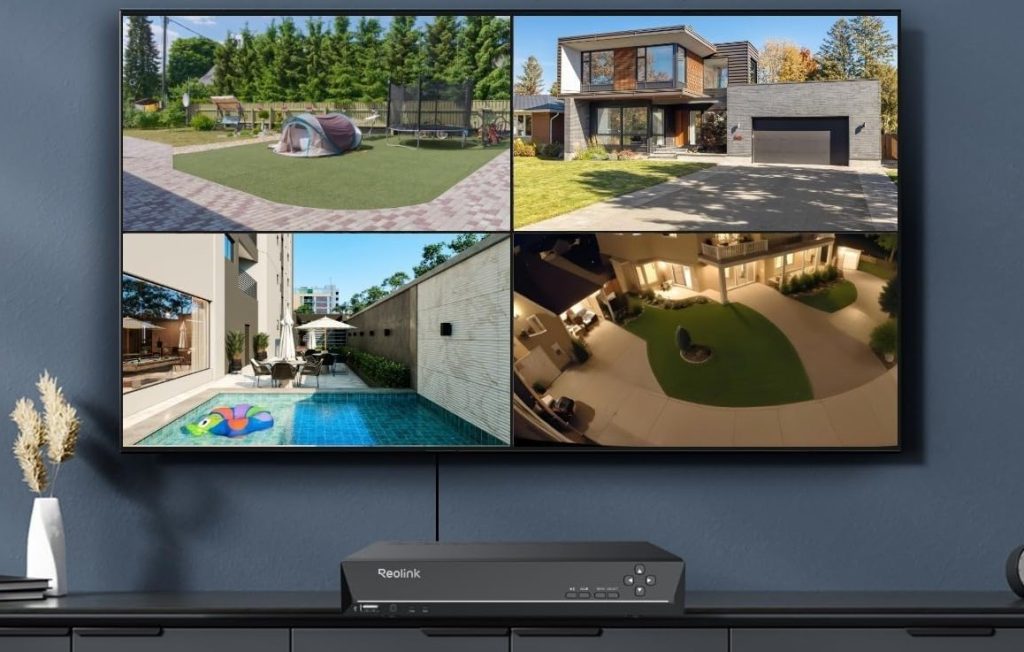
Reolink 12MP vandalproof dome kit with 8CH NVR + 2TB HDD
The full wired property build: four 12MP vandalproof domes, an 8-channel PoE NVR with a 2TB drive, and one Cat5e run per camera. There is no cloud tier, no per-camera subscription, and no battery to swap — the NVR records 24/7 to its own drive and the footage never leaves your network unless you choose remote access. One year-plus owners describe installations that simply stopped being something they think about.
- 12MP per camera — double the pixel count of typical 4K kits, so digital zoom keeps plate detail
- vandalproof dome housings — IK10-class shells rated for hits and tampering at eave height
- 8CH PoE NVR + 2TB HDD — 24/7 continuous recording to local storage, up to 16TB expansion
- no subscription, ever — every smart-detection feature works on the local hardware

Reolink RLC-811A 4K PoE bullet with 5× optical zoom
The targeted upgrade: a 4K bullet with a genuine motorized 5× optical zoom for one problem spot — a long driveway, a side gate, a garage approach. It integrates with NVR kits, but it also speaks RTSP/ONVIF, which is why the Blue Iris and Home Assistant crowd keeps recommending it. Color night vision uses spotlights you can schedule or disable if you would rather not light up the yard on every raccoon.
- 5× optical zoom — motorized lens, optical not digital — detail survives the zoom
- RTSP / ONVIF / ONVIF Port — drop it into Blue Iris, Frigate, or Home Assistant
- person/vehicle detection — on-camera smart alerts, no cloud round-trip
- microSD slot + NVR ready — records locally even without an NVR

Reolink PoE video doorbell 2K
A wired doorbell for people who refuse the monthly fee. It runs on the same PoE drop as the cameras (or your existing doorbell wiring with an adapter), answers to a mechanical chime it ships with, and stores clips locally. The 4:3 sensor frames the whole visitor instead of a forehead strip, and the review history is unusually blunt about the one real trade-off: you need an Ethernet path to the front door.
- 2K 4:3 head-to-toe view — sees packages and faces, not just torsos
- PoE single-cable install — power + data on one Ethernet run, no battery anxiety
- local storage + chime included — works fully without any cloud plan
- works with Reolink NVR — doorbell events land in the same timeline as your cameras
Who each Reolink path is actually for
Reolink sells one idea — wired power and local storage, no monthly fee — in three packages. The complaints split along the same line: buyers who wanted plug-and-play wireless and got an Ethernet project, and buyers who understood the trade and never looked back.
Whole-property system buyers — the 12MP kit
You are replacing a Deadbolt-era DVR or a battery-cam pile, you can run (or pay someone to run) Cat5e to four corners of the house, and you want footage that outlives any subscription cancellation. The $899.99 kit is the one that behaves like infrastructure: continuous recording, one app, no per-camera fees.
Single-problem-spot upgraders — the RLC-811A
You already have cameras or an NVR, but one angle keeps failing: the long driveway, the gate, the alley. One $118.99 bullet with real optical zoom and RTSP support fixes that spot and stays out of your smart-home philosophy — Blue Iris, Frigate and Home Assistant all speak to it natively.
Front-door minimalists — the PoE doorbell
You want a doorbell camera that answers the door without a $3-to-$10 monthly bill attached. If your hallway closet or attic already has an Ethernet run to the front door — or you are comfortable fishing one — this is the cleanest no-fee doorbell in the price bracket.
The three paths side by side
Prices and ratings from the brand’s affiliate feed at time of writing.
| 12MP dome kit | RLC-811A | PoE doorbell | |
|---|---|---|---|
| Best for | Whole property, 24/7 recording | One critical angle | Front door, no fees |
| Power | PoE via NVR | PoE single drop | PoE or doorbell wiring |
| Resolution | 12MP per camera | 4K + 5× optical zoom | 2K 4:3 |
| Storage | NVR 2TB (local) | microSD / NVR | microSD / NVR |
| Subscription | None — all three run fully local | ||
| Skill needed | Cable-run project | Camera swap | Door wiring or Ethernet |
| Rating history | 4.3 · 168 | 4.3 · 1,435 | 4.3 · 1,568 |
Not the right pick if… you will not run Ethernet — every recommendation on this page is wired-first, and Reolink’s battery WiFi line is a different trade-off (app dependence, no 24/7 continuous recording to an NVR).
Not the right pick if… you want footage stored off-site by default. Local storage is the feature, but it also means a burglar who steals the NVR takes the video. If cloud backup is a hard requirement, budget for an FTP or Home-Assistant offload setup rather than assuming it.
Not the right pick if… your night problem is identification at distance. The 811A’s optical zoom helps, but reviewers repeatedly note the color night vision leans on spotlights — if you will not tolerate a lit yard, a dedicated IR camera is the better tool.
Not the right pick if… you expect zero setup friction. The 1-star history clusters around NVRs not recognizing cameras and app-connect loops. Reolink’s desktop/UDP tooling is powerful but not Apple-simple.
Not the right pick if… you need small, invisible cameras. The domes and bullets are conspicuously security-grade — which deters burglars, but your HOA may feel otherwise.
What verified buyers say
Six verified Amazon reviews, paraphrased and attributed — chosen to include the failures, not just the fan mail.
Writing his review a year after installation so he could speak to durability: the system has run flawlessly through a spot that swings from extreme heat to hard freezes, without a single reboot — unlike other NVR systems he has installed. Setup was next to no hassle, video is HD, audio is clear, lag is minimal when configured correctly. His one caveat: remote access defaults to Reolink’s servers, which you can change if you want the footage to stay home.
A Blink owner tired of battery swaps and laggy motion clips that missed faces at his front walk, he researched and committed to his first PoE install. He is candid that running cable was more labor than he expected — his walls, his choice of conduit — but that is the trade PoE asks for, and the result is the reliability the wireless kit never gave him. The honest counterweight to every “it just works” story.
The counter-review worth reading: an NVR package where the recorder would not recognize the cameras, one dome developing moisture under the lens, night vision he calls terrible when zooming, and support that never made it right. He still keeps an $89 Wyze on the porch. Not every unit is a lemon and not every buyer shares this fate — but if yours arrives faulty, this is what the return path can look like.
Replaced an older 5MP unit and confirms the real-world jump in field of view and image quality. His roadmap for NVR-software users: set the camera up in the Reolink app first, then enable RTSP, HTTP and ONVIF in settings before adding it to Blue Iris. One gripe — the color-night-vision spotlights default to firing on every motion, and he turned them off. His verdict on the claim in the listing: closer to 80-plus degrees than the advertised 123.
A rough start turned good: his first unit arrived and grew moisture inside the lens — a legitimate dealbreaker for an outdoor camera — and he exchanged it. The replacement has been a different story, running on PoE into Frigate and Home Assistant via go2rtc, and performing well. The four stars are the fair average of a lemon and a keeper, and the lesson is to inspect the lens seal in week one while the return window is open.
His shopping filter was simple: no subscription to use a device he already paid for, which eliminated most major brands. Reolink’s doorbell detects humans, animals and vehicles, can place a phone call when someone rings, and took him less time to set up than splicing the RJ45 on the unterminated Ethernet his house came with. Image and video quality he calls outstanding, with an optional angled face plate for the right viewing angle.
Three setups where the wired-first logic pays off
The long-driveway plate problem
Battery cams at 40 feet shoot a smear. A 12MP dome or the 811A’s optical zoom on the same pole returns a plate — because the pixel count and the glass, not the AI label, decide what survives distance.
The rental that cannot have a cloud bill
A duplex owner with two units wants one app, no per-camera fees, and footage that stays put when a tenant complains. One NVR kit covers both entrances and the driveway for less than two years of a big-brand cloud plan.
The door nobody watches
Side doors and basement entries are where packages actually vanish. A PoE doorbell on the front plus one 811A on the side alley — both wired, both local — closes the gap without adding another subscription line item.
FAQ
Does Reolink require a subscription?
No. Every camera on this page records to local storage (NVR HDD or microSD) and the smart detection — person, vehicle, animal — runs on the camera hardware itself. Remote viewing uses Reolink’s relay by default, which is free; you can self-host instead if you prefer.
How hard is the PoE installation, really?
If your house has no existing Ethernet to camera positions, plan on fishing cable — one verified buyer described his first PoE install as more labor than expected, through no fault of the kit. The network side is genuinely easy: cameras auto-appear on the NVR, and the doorbell pairs in minutes once a cable reaches the door.
Can Reolink cameras work with Blue Iris or Home Assistant?
Yes — the RLC-811A and most Reolink IP cameras expose RTSP, ONVIF and HTTP streams. Enable them in the Reolink app settings first, then add the camera to your NVR software. Buyers run it under Blue Iris and Frigate routinely, and go2rtc integration for Home Assistant is a known working path.
Is the 12MP kit overkill for a normal house?
For identification at distance — plates, faces past the porch — the pixel headroom is the point; 4K kits start smearing past mid-driveway. If your concern is only ‘someone is at the door’, the doorbell plus one bullet camera covers it at a quarter of the kit’s price.
What breaks, according to the reviews?
Three recurring complaints: a minority of units with moisture under the dome glass (inspect the lens seal early, while returnable), NVRs that occasionally fail to recognize cameras on first boot, and app-connect loops on the WiFi models — which is one more reason this page stays wired-first.
How did you choose what to recommend here?
We are an independent review site. This page is built from the brand’s official affiliate product feed for specifications and prices, and from the public Amazon review history of each product — including the 1-star reviews, which we summarize rather than hide. If you buy through our links we may earn a commission, which is why the feed exists; it does not change what the negative reviews say.