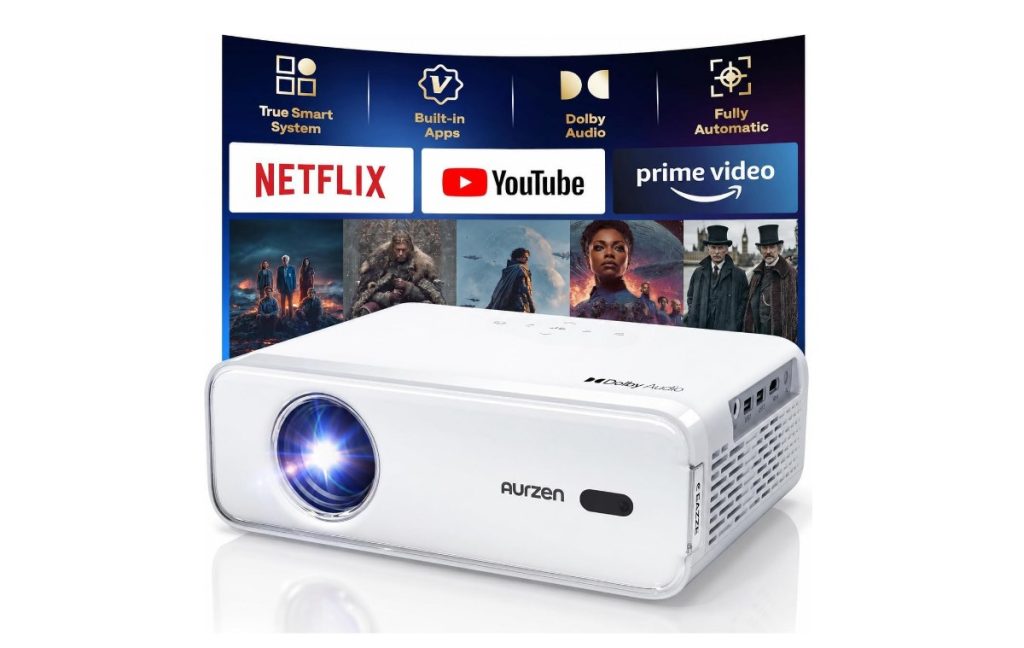

Quick answer: these are three 1080P projectors with the same auto-focus hardware and wildly different software, and the software is what decides whether you can watch what you already pay for. The EAZZE D1 ($109.99) is the cheapest and the most-reviewed — and it is the one where Hulu is not built in and a Disney+ app opens to a blank screen. The Roku TV D1R ($139.99) puts Roku on the home screen and rates 4.6; it costs $30 more and has smaller speakers. The BOOM mini ($229.97) runs Google TV and is the only one of the three that publishes a brightness figure at all — SGS-verified 500 lumens. The other two print nothing, which is why “buy the lumens” is not a decision you can actually make.
The three-product lineup
Thirteen of the 19 products in this feed are video projectors. These three span $110 to $230 after discount and cover the whole software question: no platform, Roku, Google TV.

Aurzen EAZZE D1
The cheapest and the most-reviewed of the three, and the one that generates the complaints. It runs a built-in smart TV operating system, which the listing describes as access to Netflix, Prime Video and YouTube without an extra stick. It is native 1080P with HDR10, dual 8W Dolby speakers, 5G and 2.4G Wi-Fi, two-way Bluetooth 5.1, and a full auto suite: focus, keystone, obstacle avoidance, screen alignment and 50-100% zoom. What it does not have is a named streaming platform behind that OS, and the reviews show exactly what that costs — apps that appear in the launcher but do not play, and a version of Hulu you cannot get to without hardware the box did not ship.
- built-in OS, no platform name — access to Netflix, Prime and YouTube — but no Roku or Google TV behind it
- native 1080P, HDR10, dual 8W — the 8W speakers are louder on paper than the Roku model’s 5W
- 5G/2.4G Wi-Fi, BT 5.1 — dual-band and two-way Bluetooth for external speakers
- apps may open but not play — documented: Disney+ launches, then shows a blank screen

Aurzen Roku TV D1R
The highest-rated product in this article at 4.6 over 1,440 ratings, and the price is the surprise: $139.99 after a 30% cut puts it inside $30 of the model with no named platform. For that you get Roku as the actual interface — Netflix, Prime Video, Hulu, YouTube and the Roku Channel on the home screen, a Roku account that pulls your existing app list across in seconds, and the Roku mobile app as a remote. Auto focus and auto keystone are both here. The trade-down is the speakers: dual 5W instead of dual 8W, which is why owners connect a Bluetooth speaker. It also needs a Roku account and a network connection before it will do anything at all.
- Roku is the interface — Hulu, Netflix, Prime and the Roku Channel live on the home screen, not behind a stick
- account sync pulls your apps — one owner describes the full app list arriving in a second
- dual 5W, not 8W — the documented reason people pair it with a Bluetooth speaker
- requires a Roku account — activation is not optional — no account, no projector

Aurzen BOOM mini
The only one of the three with a brightness figure you can check. 500 ISO/ANSI lumens, verified by SGS to ANSI/ISO 21118 — and that is precisely the point: the other two list no lumen number at all, so there is nothing to compare. It runs official Google TV with 10,000+ apps, has a 20W VibeBass speaker system with four passive radiators, ToF real-time autofocus, a 40-200 inch image off an integrated tilting stand, voice control and Google TV kids profiles. It is also the model with the most consistent complaint in the reviews: the software stutters navigating menus, and auto-focus and auto-keystone do not always land.
- SGS-verified 500 ANSI lumens — the only verified brightness number in this lineup — the others print none
- Google TV, 10,000+ apps — Netflix, Hulu, Apple TV, HBO, Peacock, Paramount+ without a dongle
- 20W speakers, four radiators — the audio is the reason people stop using a soundbar
- software stutters — two owners describe menus choking while loading; focus only works sometimes
Three operating systems, three different ceilings
All three are 1080P projectors with auto focus. The price gap buys the software — and the software is what decides whether you can watch what you pay for.
You want the cheapest big screen and own a streaming stick — D1 ($109.99)
Native 1080P, HDR10, dual 8W speakers, a full auto suite, and a built-in OS with no platform behind it. Cheapest of the three and the most-reviewed at 4,641. The documented risk: apps that launch and then will not play, and two independent eighteen-month failures.
You want it to behave like a television — D1R ($139.99)
Roku is the interface, so Hulu, Netflix, Prime and the Roku Channel are on the home screen and your account pulls the app list across in seconds. Highest rated here at 4.6 over 1,440. It costs $30 more than the D1 and has smaller speakers — dual 5W instead of 8W.
You want the best picture and sound you can check — BOOM mini ($229.97)
Google TV with 10,000+ apps, SGS-verified 500 ANSI lumens, 20W VibeBass audio, a 40-200 inch image off a tilting stand. The only verified brightness figure in this lineup. The documented risk: software stutter in menus and auto-focus that does not always land.
Side by side
Prices, ratings and rating counts from the brand’s affiliate feed at time of writing.
| EAZZE D1 | Roku TV D1R | BOOM mini | |
|---|---|---|---|
| Price | $109.99 (was $149.98) | $139.99 (was $199.99) | $229.97 (was $349.99) |
| Operating system | Unnamed built-in smart OS | Roku TV | Google TV |
| Hulu available | No — not built in on this version | Yes | Yes |
| Brightness figure | Not stated | Not stated | 500 ISO/ANSI, SGS-verified |
| Resolution | Native 1080P, HDR10 | 1080P | Native 1080P, HDR10, 4K input |
| Speakers | Dual 8W, Dolby | Dual 5W, Dolby | 20W VibeBass, four radiators |
| Documented weakness | Apps open but will not play; dies around 18 months | Smallest speakers; needs a Roku account | Menu stutter; auto-focus only sometimes |
| Rating history | 4.3 · 4,641 | 4.6 · 1,440 | 4.3 · 846 |
Not the right pick if… Hulu is part of how you watch television. This is not a software quibble, it is the specific thing that made a satisfied customer of this brand say she would choose differently next time. Hulu is not built into the D1 — it is only on the Roku version — and the workaround she tried was a Fire Stick plus an adapter she did not expect to need. A second owner discovered the same category of problem on a different app: the Disney+ icon is in the launcher, the app opens, the catalogue loads, and pressing play gives a blank screen. If one specific app is the reason you are buying, buy the machine whose interface names it.
Not the right pick if… you need it in a bright room during the day. Multiple owners say the same thing in different words. One watches on a beige wall ten to twelve feet away and finds it solid in a dark or dim room and hard to see in daylight; he recommends buying a screen. Another says to close the blinds or buy blackout curtains, and that with light in the room you have to make the image much smaller. A third admits the photo of the projector looks bigger and straighter than the result. Only one model here publishes a verified brightness figure at all, and 500 lumens is a dim-room number. This is a cinema-after-dark product, not a television replacement for a sunny living room.
Not the right pick if… you expect five years of service. Two unrelated owners of the same model report failure at almost exactly eighteen months — one after being knocked over several times, one that simply cut off and would not restart even after the rear filters were cleaned. Neither was repaired; both went shopping. That is a small sample and it is not proof of a designed lifespan, but it is two out of ten reviews on a single product page, and it lines up with the price. If a projector is a long-term purchase for you, this is not the price bracket for it.
Not the right pick if… you are mounting it on a ceiling and space is tight. One three-star is a review of physical size rather than performance: he upgraded from a cheaper projector that was better in almost every way he cares about — longer cord, better focus, sharper image — and still marked it down because this one is bigger and heavier. Owners elsewhere report mounting theirs upside-down from ceilings successfully, so it works; you just need to know the footprint before you drill. Measure the shelf, then read the dimensions, in that order.
Not the right pick if… you want to trust the automation. Auto-focus and auto-keystone are listed on all three, and the most specific reviewer of the most expensive model says they only work sometimes — more often than not he ends up adjusting by hand, which he notes is difficult when you cannot make out what you are seeing. That is the honest cost of an auto feature on a $230 projector: it is a convenience when it works and a worse experience than a manual wheel when it does not. If you are mounting it once and leaving it, none of this matters.
What verified buyers say
Six verified Amazon reviews, paraphrased and attributed — a year and a half of ownership ending in “buy the Roku version”, a Disney+ app that opens to a blank screen, a 65-inch TV replacement, auto-focus tested and found wanting, an eighteen-month death, and a three-star about physical size.
She owned this model for about a year and a half, was happy with it, and says the picture quality was good for the price. The durability impressed her: hers was knocked over and took several falls and kept working until it eventually stopped after eighteen months. Then the paragraph that decides this article. Her biggest frustration was Hulu — the version she bought was not the Roku version, so Hulu was not built in. She tried a Fire Stick and needed an extra adapter to get everything connected, which she describes as more complicated than expected. She is a satisfied customer of the hardware explaining why she picked the wrong SKU, and she says she would choose differently next time.
This is what “built-in apps” means when there is no platform behind them. She has a Disney/Hulu bundle subscription. The Disney+ app is in the launcher. It opens, it shows the catalogue, and when you press play on anything it goes to a blank screen. Her reasoning is cold and correct: why ship the app if it cannot play. She bought this partly so her kids could use it, and partly to avoid exactly the cable-and-dongle situation she now has to recreate. She was considering the Google TV version next but is worried it will make the same promise. That is the honest state of budget projectors with an unnamed OS: the icon is not the app.
A review about a purchasing decision rather than a product feature. She broke her 65-inch TV and did not have new-smart-TV money, so a projector had to work rather than be a novelty. Her verdict is that you can replace a TV with this one because of the Roku format: she already knew Roku, so there was nothing to learn, and the setup was signing into an account. She notes it is better for her eyes because you are not looking at a light box but at projected light, which matters to her because of chronic eye strain. Clarity was better than expected. This is the case for paying for a named OS in one paragraph: not picture quality, not lumens — the fact that the thing behaves like a television you already know.
The most technically specific four-star here, from a buyer who tested the automation instead of trusting it. He likes it: it can project a high image, streaming apps are readily accessible, Wi-Fi setup was easy. Then three numbered complaints. First, it is sharp but not razor sharp — even manually adjusted he says you will not reach 100%. Second, auto-focus and auto-ratio only work sometimes; more often than not you end up with a mess and adjust by hand, which is hard when you cannot make out what you are seeing. Third, the sound is surprisingly good for a projector but nowhere near his Bose Bluetooth speaker. That is a fair map of what $230 buys in 2026.
Two sentences that matter more than the star rating. Started as a great product, loved the picture and the sound, connected Wi-Fi and a Fire Stick without trouble. Then after a year and a half it cut off and would not come back on. He cleaned the filters at the back, which is the correct first move, and it still would not start. So he is shopping for a new projector. Set this beside the other eighteen-month report on the same model — the one that was knocked over repeatedly and eventually died — and a pattern emerges that no spec sheet will show you: these budget units appear to have a service life around eighteen months of regular use, and the failure is usually final rather than fixable.
He came from a cheaper projector and lists what improved, which makes this the most useful three-star on the page. The old unit had a 3.5-foot power cord; this one is nearly 6 feet. The old one had electric focus that required button-mashing; this one auto-focuses superbly. The image is much better — he can actually make out letters and words. So he should be happy. He is not, and his reason is physical: this projector is bigger and heavier than the one it replaced. If you are mounting it on a ceiling or a shelf with a fixed footprint, the box dimensions matter as much as the picture, and nobody photographs the box next to a ruler.
Three rooms these were built for
The bedroom wall where a TV would not fit
A projector aimed at a blank wall or the ceiling, used at night, controlled from bed. The documented win: auto focus and auto keystone mean you place it, power it on and stop fiddling; one owner uses the BOOM mini on the floor pointed at the ceiling. The documented limit: with any ambient light you have to shrink the image, so plan the wall around darkness rather than around size.
The back garden on a summer evening
A sheet, a wall, or an inflatable screen, and a group of people who all need to find something to watch. The documented win: Roku’s home screen is a television interface, so guests can navigate it; Google TV carries 10,000+ apps and voice search. The documented limit: sound outdoors is the weak point, and the Roku model’s dual 5W speakers are the reason one owner keeps a Bluetooth speaker paired.
The house that replaced a television
Not a novelty — the main screen. One owner broke a 65-inch TV and bought the Roku model because it was cheaper than a new smart TV, and reports that it works as a replacement precisely because the interface is one she already knew. The documented win: account sync, a familiar remote, Roku Channel content included. The documented limit: you need darkness, and the unit expects to be replaced in about eighteen months.
FAQ
Does the D1 have Hulu or Netflix built in?
Netflix, Prime Video and YouTube, per the listing. Hulu, no — and this is the single most useful fact on this page. An owner who had the D1 for a year and a half says her biggest frustration was that hers was not the Roku version, so Hulu was not built in; a Fire Stick needed an extra adapter to work. A second owner found the Disney+ app in the launcher, opening to a catalogue that would not play. If Hulu matters, buy the Roku TV D1R, where Hulu is on the home screen as part of Roku’s platform. The $30 difference between them is entirely this.
What is the difference between the D1 and the D1R?
They are the same physical projector family — same parent listing, same auto-focus and keystone hardware, same 1080P panel — with different software and different speakers. The D1 runs an unnamed built-in smart OS with access to Netflix, Prime and YouTube, and has dual 8W speakers. The D1R runs Roku TV, which adds Hulu, the Roku Channel and account-based app sync, and drops to dual 5W speakers. The D1R also rates higher: 4.6 over 1,440 against 4.3 over 4,641. Given the price gap after discount, the Roku version is the better buy unless you specifically want the louder speakers.
Is 500 lumens enough for a living room?
For a dark room, yes. For daylight, no — and only the BOOM mini even publishes a figure, which is SGS-verified 500 ISO/ANSI lumens to ANSI/ISO 21118. The other two listed here do not state brightness at all, so any comparison between them is guesswork. Owners describe all of these as dim-room projectors: one uses a beige wall at ten to twelve feet and calls the output solid at night and hard to see by day, recommending a screen; another says close the blinds or expect to shrink the image. A projector screen is a genuinely useful $60 if you watch before sunset.
Why do these stop working after about a year and a half?
Two owners of the D1 report it independently, at almost the same interval — one after being knocked over several times and eventually stopping, one that cut off and would not restart after the rear filters were cleaned. Neither was repaired. That is a small sample from one product page, so treat it as a pattern rather than a specification, but it is consistent with the price and with the build: these are sealed units with small fans and no user-serviceable parts beyond the filter. If you want a projector with a five-year horizon, budget for a different bracket.
Do I need a Roku or Google account?
For the D1R, yes — the listing states plainly that a Roku account and an internet connection are required for activation, and creating the account is free. For the BOOM mini, Google TV wants a Google account for the same reason. For the D1, the built-in OS works without a named platform account, but you still need Wi-Fi and your own streaming subscriptions. The upside of the account requirement is the feature owners like most: signing in once pulls your existing app list and watch history across, which is why one owner says the setup took seconds.
How was this page put together?
We are an independent review site. Specs, prices and coupon states come from the brand’s official affiliate feed at the time of writing; ratings are the public Amazon rating history of each parent product. Review summaries are paraphrased from verified Amazon customer reviews of the three products above, one-star and three-star included — every quotation is attributed to the reviewer name shown and the month it was posted. If you buy through our links we may earn a commission; it does not change which reviews we quote or what they say.