
Quick answer: ELEGOO’s cheap part is the box; the bottle is the real purchase. Buy the consumable you will keep buying and treat the machine as the entry ticket. The Centauri 2 Combo ($329) is the shortest path to a working enclosed printer — the pool calls it “a work horse” — provided you accept a camera that dies and firmware you may have to flash yourself. The 8K resin at $20.99/kg is the reason resin printing stays affordable, in grey, with ventilation. And the UNO R3 kit ($42.99) is the best-value parts box here — just don’t mistake it for a course.
The three-product lineup
A printer, a bottle, and a box of electronics. Prices are feed values at time of writing.

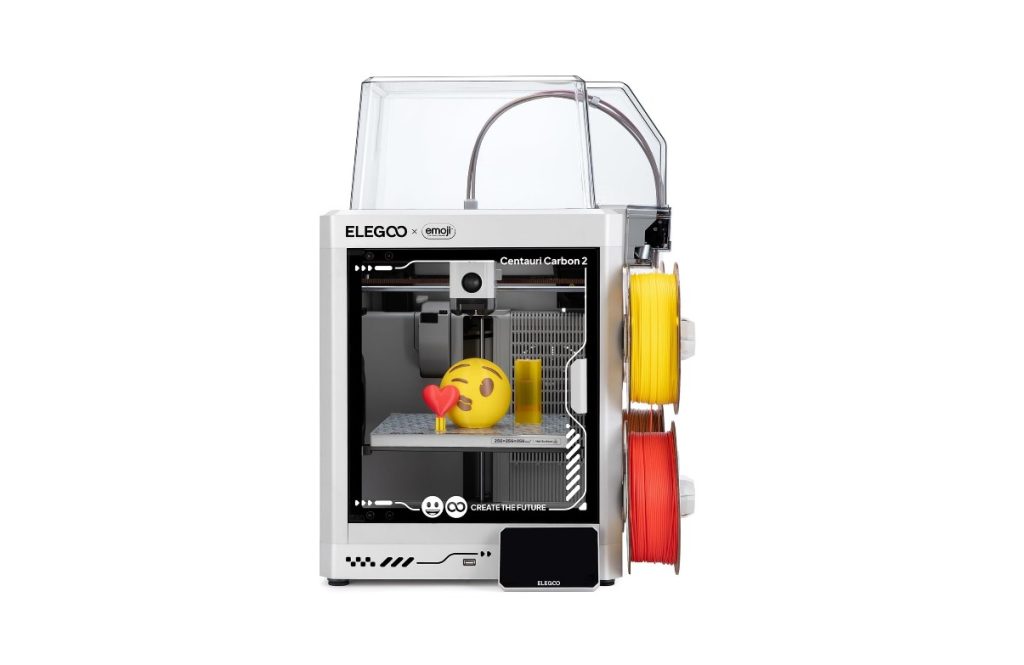
ELEGOO Centauri 2 Combo 3D printer
The one machine in this lineup that ships assembled enough to print the same afternoon, and the pool’s verdict is unusually consistent for a budget printer: “a work horse,” “extremely cheap compared to competitors,” good plate adhesion, quiet enough to live in a room, and multicolor if you add ELEGOO’s CANVAS unit later. Read the 4.1 with one caveat before you buy — this product page carries reviews for ELEGOO’s whole FDM family (Neptune 2D/3/4, Centauri Carbon 1), so some of the one-stars are describing different machines. What belongs to this printer: camera modules dying at two to three weeks, a hotend that clogs and needs a $20 replacement, firmware shipped without OTA or a manual download, and auto-levelling that one owner had to run four times to get right. Hardware praise, software grudges.
- enclosed, $329 — cheapest enclosed multicolor path in the pool — no tent, no draughts
- CANVAS multicolor is extra — and it blocks the top lid once fitted — plan the footprint
- camera module is the weak part — three separate failures at 2-3 weeks; treat it as optional
- firmware arrives old — no OTA, no manual download — the pool found one on Reddit

ELEGOO Upgraded 8K Standard Resin, 1 kg space grey
The product that decides whether resin printing is a hobby or a subscription. 4.7 across ten thousand ratings, and the pool’s reasons are practical: detail “spectacular” on an 8K machine, a profile that already exists in ELEGOO’s slicer, lower smell than most competitors (one owner measures it at “10-15 feet”), and a price per kilo that makes failed prints cheaper to forgive. The boundaries are colour-specific and worth knowing before you order grey out of habit: white and clear are the finicky ones — brittle 28-30 mm miniatures, a yellow tinge that worsens with curing, and three failed prints on one white bottle. And a high-volume seller who has burned through several bottles a week says the formula changed under him — thinner packaging, thicker consistency, cure times drifting bottle to bottle.
- $20.99 for 1 kg — the number that matters: cost per failed print, not cost per bottle
- 8K profile included — SatelLite ships a profile that works out of the box
- grey yes, white/clear no — brittleness and yellowing concentrate in the light colours
- smell is the tax — the pool’s most repeated 3-star: strongest-smelling resin they have used

ELEGOO UNO R3 Super Starter Kit
Sixteen thousand ratings at 4.7 and the same story in review after review: the parts are the value, the documentation is the weak link. Components arrive organised, the UNO R3 clone is recognised by the Arduino IDE, and the PDF tutorial gets a total beginner to a blinking LED. Where it falls down is depth — “here is a part, here is a wiring diagram, open the code and run it,” with no explanation of why the code works. The bundled disc is years out of date, and a Windows 10 driver install sent one buyer down a rabbit hole. Two owners report missing or dead parts and both got replacements fast, which is the other half of ELEGOO’s reputation: cheap hardware, responsive support, thin teaching material.
- $42.99 for the full bench — breadboard, sensors, displays, servos — one box, no extra orders
- genuine UNO R3 clone — Arduino IDE sees it; labels are in the right places
- tutorial is a manual, not a course — wiring + code, little explanation — budget YouTube time
- missing parts happen — and get replaced quickly — the pool’s support record is good
Three ladders, not one product line
ELEGOO sells three entry points that share a brand and nothing else. Pick by what you want to make, then budget the consumable — that is where the money actually goes.
You want plastic parts and a machine that just runs — Centauri 2 Combo ($329)
Enclosed, multicolour-ready, quiet. Budget $20 per hotend as a wear item and treat the camera as optional. This is the one to buy if you have never printed before and want the shortest path.
You want miniatures and detail — 8K resin ($20.99/kg)
Resin is the subscription: one bottle per project, plus IPA, gloves, and a cure station. Buy grey first. White and clear are the colours the pool complains about, and the smell decides your room.
You want to learn electronics — UNO R3 kit ($42.99)
Parts are the value; the PDF is a manual, not a course. Pair it with a video series before the box arrives and the 4.7 average is easy to believe.
Side by side
Prices, ratings and rating counts from the brand’s affiliate feed at time of writing.
| Centauri 2 Combo | 8K Resin 1 kg | UNO R3 Kit | |
|---|---|---|---|
| Type | Enclosed FDM printer | Consumable (resin) | Learning kit |
| Price | $329.00 | $20.99 | $42.99 |
| Recurring cost | Filament + $20 hotends | Every bottle, IPA, consumables | None |
| Best documented win | “A work horse” — never failed | Detail at 8K with a stock profile | Full bench for $43 |
| Documented weakness | Camera module, old firmware, no OTA | Smell; white/clear brittleness | Tutorial is shallow |
| Rating history | 4.1 · 3,742 | 4.7 · 10,092 | 4.7 · 16,632 |
Not the right pick if… you expect official firmware support. The single most repeated complaint across ELEGOO’s printer pool is software plumbing: units shipping without OTA, no manual firmware download on the product page, LAN mode and the companion app missing until you flash a build someone else found. If your tolerance for that is zero, buy a brand whose update path is documented — you will pay 60-100% more for it.
Not the right pick if… your printer lives in a bedroom or a shared office. The resin pool’s verdict is unusually blunt: this is among the strongest-smelling resins reviewers have used, smell detectable through an enclosure with a carbon filter. The printer is quiet; the bottle is not. Ventilation is not optional.
Not the right pick if… you want white or clear resin for display pieces. That is where the 3-stars cluster: 28-30 mm parts brittle enough to snap during support removal, a yellow tinge that worsens with extra curing, and one bottle that failed three prints on a machine that ran grey without complaint. Buy grey, learn the machine, then experiment.
Not the right pick if… you are buying the UNO kit as a course. The hardware is complete and the documentation is a wiring manual — several reviewers say the projects show you what to connect and hand you code without explaining why it works. The kit is excellent value as a parts box; it is not teaching you electronics on its own.
Not the right pick if… you need the camera to be reliable. Camera modules failed at two and three weeks in separate reviews, and the printer keeps printing without one — but if remote monitoring is part of your workflow, budget for it as a consumable, not a feature.
What verified buyers say
Six verified Amazon reviews, paraphrased and attributed — three that explain the praise and three that set the boundaries.
The production story: bought it for a project, then a neighbour gifted him the CANVAS multicolour system and the machine became the household’s printer. His read after months: never failed, best value per dollar of anything he researched, and he is now shopping for a second unit to double throughput. The one complaint is the slicer, not the hardware. This is the review that explains the 4.1 — enthusiasm for the machine, resignation about the software.
The honest mid-tier report: quality and price are fine — “I’m very happy with the performance overall” — then the list. Auto-levelling needed four separate cycles before it held. No Z-arm lift on filament unload, so a swap means re-checking everything. And the camera stopped responding three weeks in, mid-print, while the slicer kept tracking temperature — proof the network was alive and the camera was not. Hardware that prints well, accessories that fail early.
The software complaint the whole pool shares, stated most precisely here: the unit shipped with firmware that supports neither OTA updates, LAN-only mode, nor the companion app — while ELEGOO’s own site recommended OTA. No manual download existed for this model; he found a build in a Reddit thread, flashed it, and got the features back. Then random offline-and-idle drops started. Prints quality parts. The plumbing between the printer and everything else is where the money was saved.
The cost-of-cheap lesson: switched to a cheaper bottle to save money, got prints that would not stick to the build plate and supports that failed, then returned to this and stopped experimenting. His summary is the one that sells the product: same settings, same machine, predictable results, so the cheaper bottle was never cheaper. For anyone running a print farm or a weekly miniature habit, that predictability is the actual feature.
The ventilation review, and it is not an outlier in this pool: prints come out fine and detailed, but the odour is “overwhelming” even inside an enclosure with an inline carbon filter — he could smell it outside the room. Longer exposure times than he was used to, finicky supports, and curing yellowed the clear parts. He is not saying the resin is bad; he is saying the room you print in decides whether you can use it.
The most useful review for a beginner deciding: everything in the box works, the board is labelled correctly, the IDE sees it and runs the code. What is missing is teaching — each chapter names a part, shows a wiring diagram, and hands you code, without explaining what the code does. He rates the kit three stars not for the hardware but for the gap between “starter kit” and “course”. Buy it with a YouTube series already chosen and it earns five.
Three jobs these actually do
The first printer
A $329 enclosed box that prints the same afternoon, with a slicer profile already made for it. The documented win: “a work horse” from an owner who now wants a second one for throughput.
The miniature bench
An 8K resin printer plus a $21 bottle of grey. The documented win: detail sharp enough that the pool stops shopping for other resins — and one owner who tried a cheaper bottle and came back.
The kid who wants to build a robot
A $43 box with sensors, displays and an UNO R3 that the IDE recognises. The documented win: a ten-year-old blinking LEDs the first evening — with a parent reading the PDF beside him.
FAQ
ELEGOO Centauri 2 Combo or a resin printer first?
Buy FDM if you want parts, resin if you want miniatures — they are different hobbies that happen to share a brand. The Centauri 2 Combo is the lower-friction start: enclosed, pre-assembled enough to print the same day, quiet, and $329 for a multicolour-capable chassis (though the CANVAS multicolour unit is a separate purchase that blocks the top lid). Resin gets you detail the FDM machine cannot reach at any settings, but adds IPA, gloves, a cure station and a ventilation requirement — and the pool’s smell complaints are the loudest thing about it. Most people who own both print functional parts in FDM and display pieces in resin.
Is the 4.1 rating on the printer a warning sign?
Partly, and the reason matters: that product page aggregates reviews for ELEGOO’s whole FDM family, so some one-stars describe a Neptune 4 or a Centauri Carbon 1, not this machine. What genuinely belongs to this model, across multiple reviews: camera modules dying at two to three weeks, a clogging hotend with a $20 replacement part, firmware shipped without OTA or a downloadable build, and auto-levelling that sometimes needs several cycles. None of it stops the printer printing — the pool’s phrase is ‘prints quality parts’ even in three-star reviews — but the accessories and the software are where the budget went.
How much does resin printing really cost per month?
Count bottles, not printers. At $20.99 a kilo, a 28 mm miniature army is a few dollars of resin; the hidden costs are IPA for washing, gloves, a cure station, and failed prints. The pool’s high-volume seller goes through several bottles a week running a small parts business — that is the top end. For a hobbyist printing on weekends, one bottle lasts weeks. The reason to buy this specific bottle is predictability: one owner tried a cheaper one, got prints that would not stick, and came back, which makes the cheap bottle the expensive one.
Which resin colour should I start with?
Grey. Every complaint in this pool clusters in the light and clear colours — white that failed three prints on a machine running grey without issue, thin parts brittle enough to snap, and clear parts turning opaque and yellow with curing. Grey also shows detail best while you are learning exposure. Two other practical notes from the pool: smell is strong regardless of colour, so plan ventilation before the first print, and if a bottle sits above 30 °C the viscosity changes and stock exposure settings stop working — retune rather than assume a bad bottle.
Do I need the CANVAS multicolour system?
Only if colour is the reason you are buying. Reviews of the printer treat multicolour as an optional add-on with a real cost: the unit is bought separately and, once fitted, the printer’s top lid can no longer be used, which matters for draughts and for PLA-only advice. One owner runs CANVAS and loves it; another prints single-colour and calls it the best value per dollar he found. If you mostly print brackets, jigs, and replacement parts, skip it and spend the money on filament.
How was this page put together?
We are an independent review site. Specs, prices and coupon states come from the brand’s official affiliate feed; review summaries are paraphrased from the public Amazon review history of each product, negative reviews included. If you buy through our links we may earn a commission — it does not change which reviews we quote or what they say.