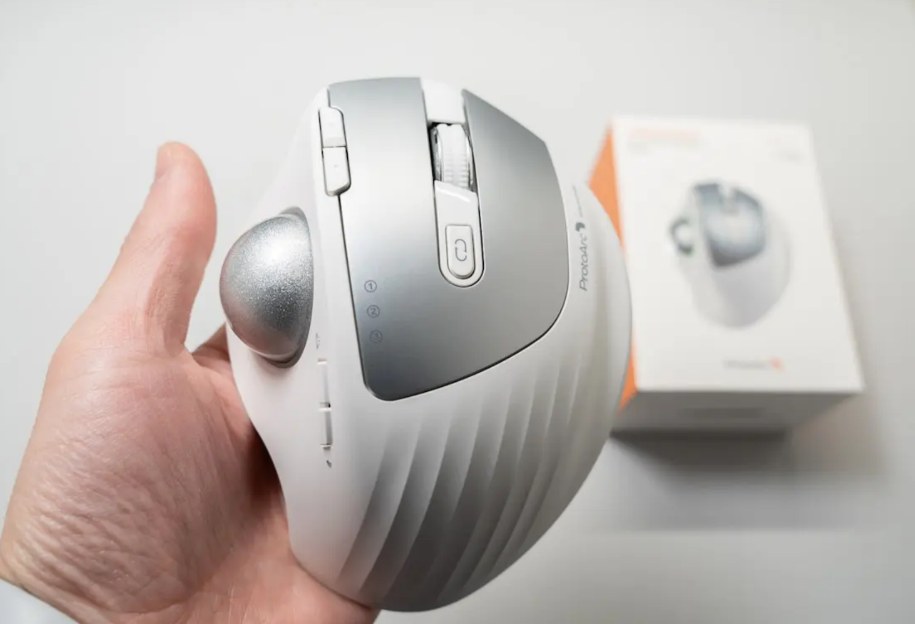

Quick answer: ProtoArc sells the posture fixes, and the honest rule is buy for the pain you have. The EM11 NL vertical mouse ($28.99, $20 coupon) is the cheapest credible wrist-pronation experiment on Amazon — 6,394 ratings and day-one relief documented. The EM06 trackball ($89.99, $20 coupon) is the specialist’s answer for glass desks and dragging strain, with a weeks-long learning curve as the price. The EKM01 Plus combo ($99.99) converts the whole desk at once — tri-device hopping, six-month batteries, and a key-sticking QC lottery you buy from an easy-return seller.
The three-product lineup
One ergonomic philosophy, three form factors. Prices are feed values at time of writing.

ProtoArc EKM01 Plus ergonomic keyboard-mouse combo
The full ergonomic workstation swap in one box: a split-wave wireless keyboard with numpad, a vertical mouse, and the tri-device switching that makes the combo feel like hardware built for people who work between three screens and a phone. The 5-star pool documents exactly that — the orange button hopping between computer and phone mid-task, twelve-hour typing days without wrist ache, a silicone dust cover that saved one desk-eater’s keyboard from crumbs, and batteries that measure six months per charge at 9-to-11-hour workdays. The 3-star column is the honest tax: a key-sticking QC pattern (A, Q, W, O, C — owners “bang on the keyboard” to unstick), Bluetooth interference quirks (one keyboard popped the snipping tool constantly until it was off), no left-handed mouse option, and a review from an ergonomics-literate owner arguing the wave is too flat to count as truly ergonomic. When the unit is good, it’s a $100 fix for wrist pain; QC is the lottery.
- split-wave + vertical mouse in one box — the complete posture swap, $100
- 3-device hop (BT1/BT2/dongle) — the orange button — verified lifesaver at work
- 6-month battery at 9–11h workdays — documented, not claimed
- key-sticking QC pattern — A/Q/W/O/C owners unsticking — the combo’s honest 3-star theme
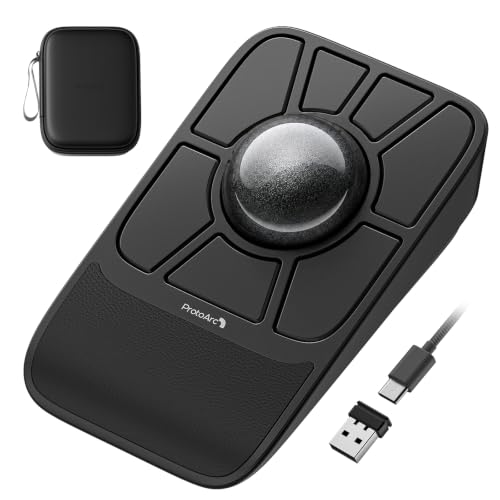
ProtoArc EM06 trackball mouse
A 55mm center-ball finger trackball for the problems mice can’t solve: glass desks (no surface needed — the device never moves), RSI from dragging (your wrist stays parked), and Kensington refugees (this is the pool’s single most repeated biography). What the 5-stars verify: a ball that rolls “like it’s on a superconductive aerogel,” an extra sensor that stops cursor jump when fingers move from ball to buttons, silent clicks, and VIA/remap support that one owner specifically bought it for after Kensington’s software demanded admin rights. The honest boundary is steep: learning curve measured in days-to-weeks (“retrain your brain”), scrolling via hold-and-roll instead of a wheel — multiple 3-stars came from exactly that absence — and small hands straining to reach buttons around the big ball. This is a specialist tool that rewards the specialist.
- 55mm center ball, stationary use — glass desks, tight trays, sofa surfing — no pad required
- VIA + web-driver remapping — the Kensington-upgrade path, verified by the refugee pool
- drag-scroll instead of a wheel — the dealbreaker 3-stars warn about — try before committing
- steep learning curve — days-to-weeks of brain retraining, documented honestly

ProtoArc EM11 NL vertical mouse
The product with the deepest pool in this article (6,394 ratings) and the clearest job: put your hand in a handshake and stop pronating your wrist all day. The 5-star pattern is almost medical: an owner with elbow and wrist discomfort “starting to wonder how I was going to get through my workday” noticed a huge difference within a day; another replaced four cheap vertical mice and a Logitech MX whose side buttons sat “in a terrible spot”; a 20-year mouse veteran and IT professional calls it premium-feeling and keeps buying them. The honest boundary: hand size matters — a 4-star owner found it too small (“hands feel very cramped”) against taller competitors, and one tester found the base’s beaver-tail contour awkward. At $28.99 with a $20 coupon, it’s the cheapest credible experiment in ergonomic posture change on Amazon.
- vertical handshake posture — documented day-one relief for wrist and elbow pain
- 6,394-ratings strong — the most field-tested vertical mouse at this price
- silent soft-click buttons — office-tested, repeatedly praised
- smaller body — check hand size — the 4-star boundary: cramped for large hands
Who each ProtoArc is for
The split is the pain you’re fixing — wrists that pronate, wrists that drag, or wrists that type.
The full-desk converter — EKM01 Plus combo ($99.99)
Wrist and shoulder pain from a whole flat-keyboard-and-flat-mouse setup, plus a phone you’re always reaching for. One box, one pairing session, one orange button. Accept the QC lottery on keys and buy from an easy-return seller.
The surface refugee — EM06 trackball ($89.99)
Glass desks, cramped trays, RSI from mouse-dragging, or Kensington exile. The specialist’s pointer — bought knowing the scroll-button learning curve and the hand-size requirement.
The aching wrist on a budget — EM11 NL ($28.99)
The cheapest credible posture experiment on Amazon: handshake grip, silent clicks, 6,394 ratings of field history. Measure your hand first — small body, big relief if it fits.
Side by side
Prices and ratings from the brand’s affiliate feed at time of writing.
| EKM01 Plus combo | EM06 trackball | EM11 NL vertical | |
|---|---|---|---|
| Fixes | Typing + mousing posture, device juggling | Surface + dragging strain | Wrist pronation |
| Best documented win | 12-hour days pain-free; 6-month battery | Kensington escape; glass desks | Day-one relief, 6,394 ratings |
| Learning curve | Days (split-wave layout) | Weeks (trackball + scroll-button) | Days |
| Documented weakness | Key-stick QC pattern | No scroll wheel/ring | Small body vs large hands |
| Price | $99.99 | $89.99 ($20 coupon) | $28.99 ($20 coupon) |
| Rating history | 4.2 · 858 | 4.5 · 90 | 4.4 · 6,394 |
Not the right pick if… you game. These are productivity ergonomics — vertical mice and trackballs trade flick speed for comfort, the keyboard’s wave adds travel, and nothing here has the polling or button placement of a gaming peripheral. One owner keeps a second mouse for games; that’s the pattern.
Not the right pick if… you have large hands and didn’t measure. The EM11’s own 4-stars warn that it runs three-quarters of an inch shorter than competitors — “hands feel very cramped” — and the EM06’s button ring assumes average-or-better reach around a 55mm ball. Check the dimensions against your palm before clicking.
Not the right pick if… you expected the keyboard to be truly ergonomic in the clinical sense. One ergonomics-literate 3-star is blunt: the wave keeps wrists neutral side-to-side but still pronates them flat — “it simply doesn’t meet the criteria for an ergonomic keyboard.” It’s a comfort upgrade over flat boards, not a medical device.
Not the right pick if… you’re on a left-handed setup. The combo’s mouse is right-hand vertical only — a 3-star asked, and the company doesn’t make a left-handed version. Lefties should buy the keyboard and mouse separately, or look elsewhere entirely.
Not the right pick if… zero patience for adaptation. The trackball’s learning curve is real — weeks of brain retraining, a scroll-button habit to build, and the default button map you shouldn’t touch until muscle memory forms (one owner remapped early and made the mouse “almost impossible to use”). Buy the EM06 for the destination, not the first week.
What verified buyers say
Six verified Amazon reviews, paraphrased and attributed — weighted toward the boundary-setting reviews this category needs most.
The multi-device story in full: keyboard on Bluetooth-1 to the computer, Bluetooth-2 to the phone, and the orange button hopping between them for texts and lookups mid-task — “a lifesaver at work.” Under two minutes from box to typing. The buying reason was ergonomic; the feature that sold the review was the workflow.
The honest long-term arc: 15 months of daily use, “absolutely love it,” wrist and shoulder pain relieved, screen-sleep button appreciated — and then the QC shadow. Other owners in her position report A/Q/W and O keys sticking within months, needing “banging” to unstick, and one seller refunded fully after a public review rather than replacing. Her arc stayed positive; the pattern around her didn’t. Buy from a seller with easy returns.
The trackball biography this product runs on: Kensington Expert Mouse loved for feel, hated for Bluetooth that “was atrocious,” switching that was a nightmare, no adjustable DPI, and software demanding admin rights his work machine forbids. The EM06 gives him the ball, the VIA support, silent buttons and reliable tri-mode switching — plus a drag-scroll he adores — the best trackball he’s ever used.
The boundary for Kensington Orbit owners specifically: coming from a dedicated scroll ring, scrolling by holding a button and rolling the ball proved “extremely uncomfortable,” and the flat button layout lost to the Orbit’s sculpting. Small movements carry the same stiction his old static-bearing Kensington had, despite the advertised active bearings. “Not for me” — the honest specialist’s verdict that keeps the learning curve honest.
The pain-recovery arc the vertical category exists for: elbow and wrist discomfort bad enough to threaten the workday, bought alongside an ergonomic pad, and within a day “a huge difference in how my arm and wrist felt.” The instructions warned of one to two weeks of adjustment; comfort arrived faster. Kept the mouse, kept the job, wrote the review.
The honest sizing review: coming from Lekvey and Anker verticals, this one is more ergonomic and nicer-looking — but three-quarters of an inch shorter, leaving her hand “almost like if my hand is scrunched.” The 4 stars instead of 5 are pure geometry: measure your hand before buying. The pattern the whole EM11 pool repeats — great mouse, check the fit.
Three desks these devices fix
The twelve-hour workday
Desk lunches, back-to-back calls, pain creeping in by Thursday. The documented win: the combo’s owners typing full days pain-free with batteries that outlast quarters.
The glass or cramped desk
Beautiful surface, zero tracking; or a keyboard tray the size of a cutting board. The documented win: a trackball that never moves and never needs a pad.
The RSI scare
Wrist pain that’s started costing workdays. The documented win: a $28.99 vertical experiment delivering day-one relief — before the physical therapy appointment, as a complement to it, not a replacement.
FAQ
Vertical mouse or trackball — which for wrist pain?
Different mechanics, matching different pain. The vertical mouse (EM11) fixes pronation — the flat-twist your wrist does all day — and the pool documents day-one relief for exactly that. The trackball (EM06) fixes motion — your hand stays parked and your fingers do the work — which suits dragging strain, glass desks, and tight spaces, at the cost of a weeks-long learning curve. The honest split: pronation pain, start vertical (it’s $28.99); motion or surface problems, commit to the trackball. Persistent pain belongs to a doctor, not a peripheral.
Is the combo's keyboard actually ergonomic?
Comfortable, split-wave, and neutral in side-to-side deviation — but one ergonomics-trained owner’s 3-star is the honest ceiling: the wave isn’t tall enough to un-pronate your wrists, so it’s a big comfort step up from a flat board rather than clinical ergonomics. Owners with wrist and shoulder pain report real relief at 12-hour typing days; owners with diagnosed RSI should still see the specialist. Pair it with the vertical mouse and you’ve moved most of the way there for $99.99.
What's the key-sticking problem about?
The combo’s 3-star pattern: individual keys (A, Q, W, O, C and Tab show up by name) that start sticking within weeks to months, sometimes fixed by power-cycling, sometimes needing literal banging. It’s a QC distribution, not a universal fate — the 15-month and multi-year owners in the pool never see it. The practical protocol: buy from an easy-return seller, type all the letter keys hard in week one, and exercise the warranty early if anything sticks.
How steep is the trackball learning curve, really?
The pool’s honest numbers: basic proficiency takes days, real fluency takes weeks — ‘retrain your brain’ is a reviewer’s phrase, not marketing. Two specific rules from experience: don’t remap the buttons until muscle memory forms (one owner bricked his own usability doing exactly that), and know that scrolling is a hold-and-roll of the ball, not a wheel — the single most common reason Kensington scroll-ring owners return it. If you’ve never used a trackball, give it two weeks before judging.
Will the vertical mouse fit my hand?
The EM11’s honest boundary is size: it runs smaller than Lekvey and Anker verticals — about three-quarters of an inch shorter — and the 4-star pool says ‘very cramped’ for larger hands, ‘perfectly placed’ for small-to-average ones. The test the pool suggests: measure palm height from base to middle-finger base; if you’re over around 4.3 inches / 110mm, look at the taller competitors or ProtoArc’s larger EM-series bodies.
How was this page put together?
We are an independent review site. Specs, prices and coupon states come from the brand’s official affiliate feed; review summaries are paraphrased from the public Amazon review history of each product, negative reviews included. If you buy through our links we may earn a commission — it does not change which reviews we quote or what they say.