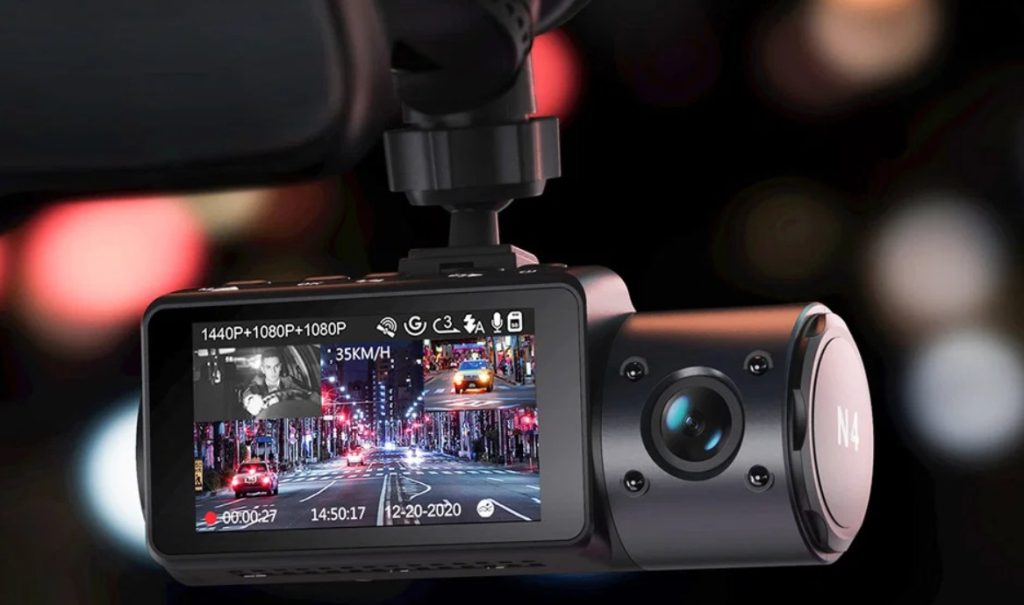

Quick answer: Vantrue’s dash cam lineup rewards one decision made before any spec comparison: how many directions do you need recorded? The N5S ($379.99) covers all four for rideshare and fleet work; the N4 Pro S ($399.99) is the night-clarity flagship with true 4K; the S1 Pro ($126.99) delivers front-and-rear 60fps for the price of a tank of premium fuel. Same sensor family across all three, one recurring caveat no review hides: extreme windshield sun is the enemy of every dash cam — plan the shade.
The three-pick lineup
A channel-count ladder, priced honestly. Ratings are family-level histories.

Vantrue N5S 4-channel 360° dash cam
Four lenses, one windscreen: front, rear, and two interior views that leave no blind angle — the N5S is the answer for rideshare drivers, fleet owners and anyone whose insurance dispute needs more than a forward view. All four cameras run Sony STARVIS 2 sensors, the front captures 2.7K HDR, and you can disable channels you do not need. The review history is candid about the cost of coverage: the rear-cable run is the hard part of the install, and the 4.1 average includes owners who wish the glass reflections were handled differently.
- 4 channels: front + rear + 2 interior — 360-degree evidence for rideshare and fleet use
- STARVIS 2 sensors on all four — low-light detail that cheaper multi-cams fake
- 2.7K HDR front / 2.5K rear — plates and signs stay readable at speed
- per-channel enable/disable — record only what your job needs

Vantrue N4 Pro S 4K 3-channel dash cam
The resolution leader: true 4K front, 2.5K rear, and an infrared cabin camera — all on triple STARVIS 2 sensors. Owners single out the low-light performance: license plates at night, glare from trailing headlights handled, cabin footage crystal-clear in pitch dark. At $399.99 it prices like a flagship because it is one; the 4.4 average is the highest of the family, earned mostly in the image-quality comments.
- 4K front / 2.5K rear / IR cabin — triple-channel clarity without channel compromise
- triple Sony STARVIS 2 HDR — the low-light claim reviewers verify on night drives
- GPS + WiFi app pairing — speed and location stamped into every clip
- 4.4 across 1,116 ratings — the family’s best-rated current flagship

Vantrue S1 Pro 60fps dual dash cam
The two-channel answer for everyone who does not need interior coverage: 4K-class front, rear camera, 60fps recording that makes motion artifacts disappear, and GPS on board. At $126.99 it is the entry point that still carries the brand’s sensor quality — reviewers describe it as the model that converted them from cheap cams, and one long-term user replaced a failed unit with the same model rather than shopping around.
- 60fps recording — motion smoothness that single-frame-rate cams smear
- STARVIS 2 AI dual sensor — front-and-rear coverage at the family’s lowest price
- GPS built in — speed and route stamped for insurance disputes
- 781 ratings at 4.2 — the value option with real history
Who each Vantrue is for
Vantrue’s lineup reads as a channel-count ladder, and the reviews confirm the ladder is the right way to buy: decide how many directions you must cover before you look at resolutions. The recurring 1-star theme — overheating and glare in high-sun climates — is a climate variable, not a model variable.
Rideshare and fleet drivers — N5S ($379.99)
Your insurance and liability story needs all four directions: forward traffic, tailgaters, and the cabin in two angles. Owners confirm the accessory kit is complete and the channels can be toggled — the price of coverage is the rear-cable run and a bigger windscreen presence.
Night-driving image obsessives — N4 Pro S ($399.99)
You want the best plate-reading and cabin clarity the brand sells: 4K front on STARVIS 2, infrared cabin, glare handling. This is the family’s highest-rated current model (4.4) — and the one where the flagship price is actually about image quality rather than channel count.
First serious dash cam buyers — S1 Pro ($126.99)
You are stepping up from a $30 no-name cam or replacing a dying one. Front-and-rear at 60fps with GPS covers the overwhelming majority of dispute scenarios; interior coverage was never your requirement, and this is where the money you did not spend goes back in your pocket.
Side by side
Prices and ratings from the brand’s affiliate feed at time of writing.
| N5S | N4 Pro S | S1 Pro | |
|---|---|---|---|
| Channels | 4 (front/rear/2× cabin) | 3 (front/rear/cabin) | 2 (front/rear) |
| Front resolution | 2.7K HDR | 4K | 4K-class, 60fps |
| Sensors | STARVIS 2 × 4 | STARVIS 2 × 3 | STARVIS 2 AI dual |
| Cabin night view | IR × 2 | IR × 1 | — |
| GPS / WiFi | Yes on all three | ||
| Best for | Rideshare / fleet | Night clarity flagship | Value dual-channel |
| Rating history | 4.1 · 2,234 | 4.4 · 1,116 | 4.2 · 781 |
Not the right pick if… you park in extreme sun. The loudest 1-star review documents overheating reboots with a black-bodied unit under direct windshield sun — in hot-sun states, look for models with supercapacitors and lighter shells, and use a sunshade when parked.
Not the right pick if… your windshield is heavily tinted or you cannot tolerate reflections. No model in this comparison ships a polarized lens; one owner’s glare complaint is the family-wide gap. Polarizing filters exist as accessories — budget for one if reflections matter.
Not the right pick if… you reconfigure WiFi often. A 3-star reviewer’s loop — full re-setup on every app launch after a move — is the known friction point. Plan the install once and leave the network alone.
Not the right pick if… you will not do a cable run. Multi-channel coverage is only as good as the rear camera’s install; routing under the headliner around side airbags is the part every honest reviewer calls the hard half.
Not the right pick if… you want cloud backup. Vantrue records to microSD locally; there is no cloud-upload tier. If you need off-vehicle footage survival, that is a different product category.
What verified buyers say
Six verified Amazon reviews, paraphrased and attributed — including the overheating dissent that every high-sun-state buyer should read first.
He walks through the four coverage points — front, rear, and two interior angles — and calls it a must for anyone wanting added security or insurance evidence. His unboxing notes read like a checklist: front and rear cameras with a spare mounting sticker, all cables included, window films for the mounts, cigarette-lighter power plus a short USB-C backup. Accessing and saving media to a phone is easy — his only real work was hiding cable to the rear camera.
Two years on the 4-channel N4, upgraded for the new rear-cabin camera. His verification of the spec claims: all four cameras genuinely run Starvis 2 sensors with strong low-light detail, front records 2.7K HDR with rear at 2.5K, and the interior pair use infrared at night. Practical wisdom included — the hardest part of any multi-cam install is routing the rear cable under the headliner while avoiding side airbags. You can run fewer channels if you do not need all four.
The dissent that shapes expectations: no anti-glare polarized lens to fight windshield reflections, a dark body that overheats under direct sun — rebooting until he stopped trusting it — and app-connect loops that took twenty minutes and ten attempts. In hot-sun states he says the device cannot be trusted; his rating fell to one star over time. Read alongside the five-star owners in milder climates: the hardware is good, the thermal and glare limits are real.
A methodical install account: mounts placed, the recommended 12-hour wait for adhesive to cure, then final setup. App pairing he calls ridiculously simple once connected to the dash cam’s WiFi — and he notes you will need the app eventually for firmware updates regardless. On the car, the N4 Pro S looks factory: solid build, magnetic latch mount, SD slot and reset hidden under the power port cover.
His verdict after daily driving: peace of mind every single day. The flagship hardware case writes itself — true front, cabin and rear coverage on triple STARVIS 2 sensors worth the premium over cheaper multi-cam setups. Specifics: 4K front captures plates and street signs with exceptional sharpness, the 2.5K rear handles trailing-headlight glare, and the cabin camera’s infrared produces crystal-clear interior footage even in pitch-black conditions.
The friction review: she loves the angles and found installation fine, but after a move and new WiFi the camera demands a full re-setup every time she opens the app — pairing from scratch, every single time. Her verdict is fair and specific: quality product, good features, “it just hates me apparently.” If your WiFi credentials change often, budget an evening for the re-pairing dance.
Three scenarios where channel count decides the claim
The rideshare dispute
A passenger claim has no dashcam footage unless the cabin is recorded — in two angles. N5S owners chose four channels for exactly this: the interior infrared pair covers what the forward lens cannot, at night, without visible light in the cabin.
The parking-lot hit-and-run
Rear-channel coverage is what separates “something hit me while parked” from a plate, a model and a direction. Owners of the N4 Pro S and S1 Pro both cite rear footage as the moment the system paid for itself.
The night highway near-miss
Plate readability at speed is a resolution-and-sensor story, not a story about channel count: the N4 Pro S’s 4K STARVIS 2 front exists for the 11pm license plate that a 1080p cam renders as two white dots.
FAQ
How many channels do I actually need?
Two covers the vast majority of accidents (front and rear). Add a cabin channel if you drive passengers or want interior evidence; the N5S’s second interior lens matters mainly for rideshare and fleet compliance. Buy the channel count your liability requires — not the biggest number.
Is the install hard?
Front-camera mounting is easy; the universally cited hard part is routing the rear-camera cable under the headliner while avoiding side airbag curtains. One N5S owner inventoried everything in the box — spare mounting sticker, trim tool, window films — so the hardware is complete; the labor is the install.
Do Vantrue cams overheat?
The known risk case is direct windshield sun in hot climates — one detailed 1-star review documents reboot loops with a black-bodied unit. The family uses supercapacitors rather than lithium batteries specifically for heat tolerance, but in extreme-sun regions a sunshade and tint are part of the setup.
Does it record while parked?
Yes — parking mode is supported, with hardwire kits available in the brand’s feed for constant power. Note the fine print from Vantrue’s own accessory listings: dedicated hardwiring (or an OBD cable) is required for 24/7 parking surveillance; the cigarette-lighter socket usually goes dead with ignition.
What do I need for the app?
The app pairs over the camera’s WiFi for settings, file transfer and firmware updates. Reviews call pairing simple on a fresh install — the documented pain is re-pairing after a WiFi change, which a 3-star reviewer describes as starting from scratch. Set it up once and leave it.
How was this review assembled?
We are an independent review site. Specifications and prices come from the brand’s official affiliate product feed; the review summaries are paraphrased from the public Amazon review history of each product, including the overheating and app complaints. Buying through our links may earn us a commission — it does not change what we quote.