
Quick answer: Nanoleaf is one ecosystem wearing three shapes, and the purchase mistake the pool documents most is buying the wrong one first. The Blocks Combo 10PK ($199.99) is the new platform — squares with a pegboard and shelf, October’s $42.49 conversion, and a 4.0-over-46 sample we flag rather than inflate. The Triangle 3PK ($49.99) is the classic Shapes family’s growth pack — controller not included, an owner’s four-star says it plainly: without the starter kit this product is useless. The Essentials lightstrip ($42.64) is the standalone door into Matter/Thread. What the whole catalog shares: premium light, hobbyist installation, and the two recurring taxes — adhesive that slides and pairing marathons that repeat when your router changes.
The three-product lineup
73 listings in the US feed across the three platforms, all at the 25% commission tier — panels, expansion packs, bulbs and strips. These three are the ecosystem’s entry doors.

Nanoleaf Blocks Smart LED Wall Panels
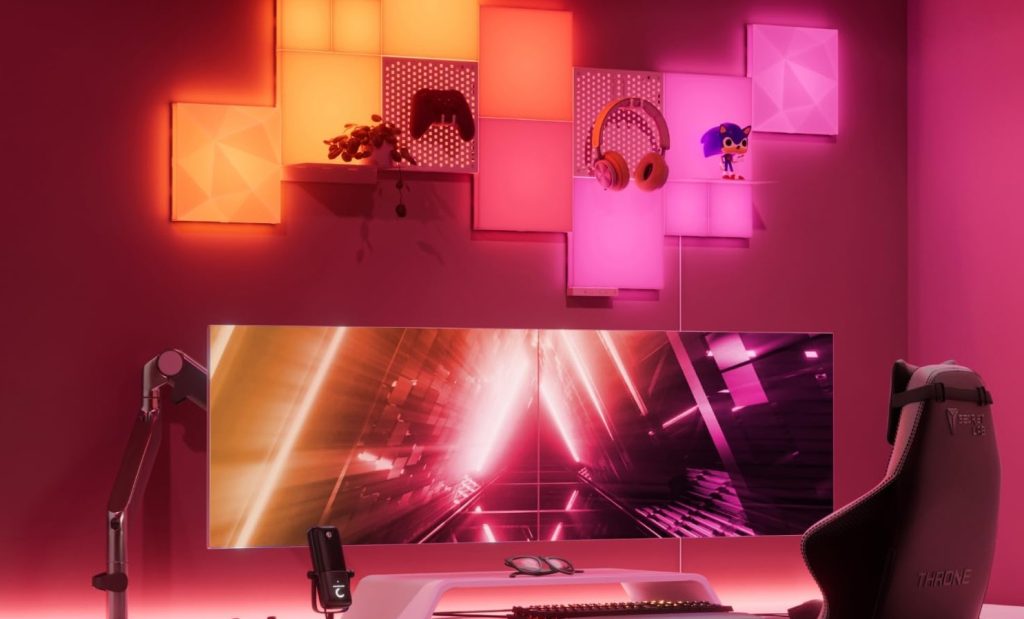
October’s conversion and the newest platform — 4.0 over 46 ratings, a sample we flag as such. What Blocks adds over the classic panels: squares with real function. The combo kit includes a pegboard and a shelf panel, so the wall art also holds collectibles and gadgets; expansion packs in the feed include textured tops you swap in for a different look. Screen mirroring and rhythm (sound-reactive) are on board, plus every ecosystem: HomeKit, Alexa, Google, SmartThings. The pool’s verdicts: gorgeous lights, nightmare-adjacent installation (the included anchors are called hot garbage by one owner, and pairing was buggy for another), and a tip from a satisfied owner that is worth the whole paragraph — go BIG, because the pegboard and shelf are worth it, and add a textured expansion pack to make the design yours.
- square panels + pegboard + shelf — wall art that carries objects — the actual Blocks differentiator
- 4.0 over 46 ratings — new platform, small sample, flagged honestly; the classic lines below carry the track record
- screen mirror + rhythm + all ecosystems — HomeKit/Alexa/Google/SmartThings; the app is the shared brain
- installation is the learning curve — anchors criticized, pairing buggy for some; a YouTube video before you start is the pool’s advice

Nanoleaf Shapes Triangle Expansion
Read the card title again: expansion. This is a 3-panel pack for people who already own a Shapes Smarter Kit — it requires the controller and power supply that ship with the starter, and the listing’s own bullets say so three times. That did not stop the pool’s most instructive four-star: I did not read that you need a starter kit to use this; without it this product is useless. With it, the lights were amazing, very bright, many modes. The listing carries 4.4 over 1,823 because the panels themselves are the brand’s proven commodity — adhesive mounting, app scenes, touch control, HomeKit. If you are starting from zero, the math is starter kit + expansions, not this pack alone; if you already have a Shapes wall, this is how it grows.
- requires a Shapes Smarter Kit — controller and PSU are not included — the pool’s documented surprise, and the listing’s own warning
- 4.4 over 1,823 shared with the Shapes family — the classic panels’ proven record, pooling across expansion packs
- adhesive mount, touch-interactive — the original formula: stick, tap, configure in app
- plan the design, then buy the panels — expansions are how a wall grows after the starter sets the geometry

Nanoleaf Essentials Smart Lightstrip
The standalone answer — no starter kit, no wall, no controller ecology: one strip, one in-line controller with physical buttons, Matter over Thread or Bluetooth. 60 color zones and 2200 lumens per the box (bright, per owners, brighter than the Govee strips one replaced). The pool’s honest catches are specific. The title says with remote — that means the buttons on the attached controller, not a wireless remote, a distinction one owner calls questionable marketing. The connector between strip and controller is the recurring failure point: flicker, dropouts, one owner glued it, another called the design badly engineered. And the silicone sheath makes under-cabinet kitchen installs hard — clips, corners and cuts all fight it. As a first Nanoleaf for a desk or TV alcove, it is the cheapest honest entry; for kitchen cabinetry, read the three-star below first.
- Matter + Thread + Bluetooth — works with Apple Home, Google, Alexa; a Thread border router (HomePod mini, Apple TV) unlocks the good responsiveness
- 60 addressable zones, ~2200 lumens — gradients, not just washes; brighter than the cheaper strips owners came from
- "with remote" = attached controller buttons — not a wireless remote — the marketing distinction one owner flags
- strip-to-controller connector is the weak link — flicker and dropouts documented; some owners glue or clamp it
Which surface, for which wall
Nanoleaf is one ecosystem sold as three product shapes. The shape you buy is the surface you have.
A feature wall you want to grow — Blocks Combo ($199.99)
Squares with a pegboard and shelf, screen mirror and rhythm on board. The new platform — small sample (4.0/46), real conversion in October. Budget an install afternoon and better anchors.
An existing Shapes wall — Triangle 3PK expansion ($49.99)
Three more panels for a wall you already own — the controller and PSU come from your starter kit, not this box. The pool’s documented mistake is buying it first.
A desk, TV alcove, or shelf edge — Essentials strip ($42.64)
Standalone, Matter/Thread, gradients along 6.74 ft. The cheapest honest entry into the ecosystem, with a known connector weak point and a sheath that hates carpentry.
Side by side
Prices, ratings and rating counts from the brand’s affiliate feed at time of writing.
| Blocks Combo 10PK | Shapes Triangle 3PK | Essentials Lightstrip | |
|---|---|---|---|
| Price | $199.99 | $49.99 | $42.64 |
| Rating history | 4.0 · 46 (2024 platform) | 4.4 · 1,823 (Shapes family pool) | 4.3 · 553 |
| Form | 10 squares + pegboard + shelf | 3 triangles (expansion) | 6.74 ft strip, 60 zones |
| Standalone? | Yes — controller and PSU in kit | No — requires Smarter Kit | Yes — in-line controller |
| Ecosystem | HomeKit, Alexa, Google, SmartThings, Matter-class | Same via Shapes controller | Matter + Thread + BT |
| Documented catch | Anchors weak; pairing buggy; never on a smart switch | Adhesive slides; hours-long app pairing | Connector flickers; sheath fights kitchen installs |
| October conversions | 1 — $42.49 (brand’s largest) | — | — |
Not the right pick if… you are buying the $49.99 triangle pack as your first Nanoleaf. It is an expansion: no controller, no power supply, and the listing’s own bullets repeat the requirement. The pool’s owner who made exactly this mistake wrote the product’s best review — without the starter kit, this product is useless. Buy a Shapes Smarter Kit first, or the Blocks Combo, or the standalone strip.
Not the right pick if… you are not prepared to install it properly. The pattern across both panel platforms: pairing marathons (hours of rebooting, repeated when the router changes), anchors the pool calls hot garbage, and adhesive that let a full grouping slide down a freshly painted wall after eight months. The output is premium; the mounting and pairing are hobbyist-grade. Budget the YouTube video, the better anchors, and the mounting tape before you click buy.
Not the right pick if… your plan involves a smart switch on the wall socket. A satisfied Blocks owner’s warning in caps: never put the device on a smart switch — cutting power forces a full re-setup every time. Control lives in the app, the physical button, or your home assistant. If the outlet is switched, put tape over the switch or change the plan, because the re-pairing marathon is the documented cost of forgetting.
Not the right pick if… you wanted the lightstrip’s remote to be a remote. The Essentials title says with remote; the object is a 4-inch cable-tethered control box with buttons. If a nightstand clicker was the plan, this is not that product — and the connector on that box is the strip’s documented weak point (flicker, dropouts, owners gluing it in place). Buy the strip for the Matter/Thread light quality, not the control hardware.
Not the right pick if… the install is under kitchen cabinets. The Essentials’ silicone sheath blocks screw-in clips, fights cornering, and makes cut-points awkward; the owner who tried needed third-party clips and wires, and he was one of the patient ones. Exposed runs — desk edges, TV alcoves, shelving — are what the strip is shaped for. Carpentry is what it is not.
What verified buyers say
Six verified Amazon reviews, paraphrased and attributed — the starter-kit mistake in an owner’s own words, the gorgeous-nightmare install, the wall that slid after eight months, the smart-switch warning in caps, the remote that is not a remote, and the kitchen that fought back.
The single most useful review in Nanoleaf’s whole catalog, because it documents the exact purchase mistake the expansion-pack structure invites. He did not read that a starter kit is required — without it, the three panels are decorative plastic. After he bought the starter pack: the lights were amazing, very bright, and they have many different modes. Four stars, lesson learned, and the lesson generalizes: every classic Nanoleaf wall starts with a controller-bearing kit, and the cheaper expansion packs are only panels. Check your cart for a controller before you check out.
The Blocks platform’s honest two-star, from an owner who loves the product: the lights are gorgeous, but the installation was a NIGHTMARE for me. You absolutely need to watch a YouTube video before doing anything — not one from the brand, one from an average person, she specifies, which is its own review of the manual. The included anchors are hot garbage; she replaced them. Pairing was super buggy, and multiple connectors did not work until she hit them with pressurized air. But great afterward — make sure to be prepared af. That is Blocks in one review: premium output, hobbyist install, budget an afternoon and better anchors.
The classic panels’ durability arc in one review. Eight months after install: the app connection took a couple of hours of rebooting, reinstalling, unplugging — and when a new router arrived, the entire pairing marathon repeated. Then the adhesive: he pressed hard for 30 seconds per the instructions on a freshly painted, perfectly smooth wall, and about a week before the review the entire grouping started sliding down and to the right, visible gap and all. The panels are the product; the adhesive and the app pairing are the two recurring taxes on it. Plan mounting tape for anything you intend to keep vertical.
Two operational tips from a satisfied Blocks owner. First: if you are thinking about the blocks, go BIG — the peg board and shelf are worth it, and you can order an expansion pack of the textured version and swap the top panels out for a truly unique look. Second, the warning that belongs in every smart-light listing: DO NOT put this device on a smart switch, or it will stop working and you will have to set it up again — it does not like having its power cut off and turned back on. Control it through its app, its button, or your home assistant integration. Compliments constant, tip use AI to debug issues — the modern owner’s manual.
The Essentials’ marketing honesty check, from an otherwise happy buyer. The criteria that sold him: HomeKit-native, ~6 ft, Thread support, good price. Then the distinction he wants everyone else to catch: the product title says with remote, and most people would assume a lightstrip with a remote means a wireless remote — the $10 overseas strips have those. What it means here is the control box attached to the strip by a 4-inch cable has buttons on it. On-board controls, not a remote. Be aware if you wanted a clicker for the nightstand. Also: no case, and note the strip is not cuttable to arbitrary lengths like some competitors.
The three-star that saves an afternoon. HomeKit pairing: a breeze. Siri response: good. The under-kitchen-cabinet install: obstacle after obstacle. The silicone sheath precludes the screw-in clip mounts unless you cut it away, which is time-consuming; the sheath also makes cutting the strip to expose contacts difficult; cornering around cabinet seams is barely an option; and the cut lengths are too long to be tidy. He needed third-party clips and wires to make it work. His verdict on the light itself is positive — bright, vibrant, responsive over Thread — the product is simply designed for exposed runs, not carpentry. Under-cabinet shoppers: measure the sheath, not the strip.
Three rooms these were made for
The gamer’s accent wall
Blocks Combo behind the battlestation: screen mirror during games, rhythm mode for music, pegs and the shelf holding the collectibles the backlight shows off. This is the platform’s native habitat — the design the marketing shows is real, and October’s $42.49 commission came out of exactly this room. Add the textured expansion pack when the wall needs a second chapter.
The slowly-growing Shapes wall
Starter kit first — the controller is the household’s — then a 3-pack per season as the design grows around a doorframe or a reading corner. The 1,823-rating family pool is the brand’s longest track record; the adhesive and the router-change re-pairing are the two taxes on the plan. Fresh paint plus mounting tape from day one is the veteran’s move.
The Matter household’s first smart light
Essentials strip on the desk edge or behind the TV, a HomePod mini or Apple TV as the Thread border router, and the payoff the pool describes: responsiveness and reliability equal to Hue for a lot less money. The strip does gradients the bulbs cannot; the connector gets clamped to the desk leg and forgotten. The cheapest honest door into the whole ecosystem.
FAQ
What is the difference between Blocks, Shapes and Essentials?
Shapes are the classic adhesive wall panels — triangles, hexagons, mini triangles — sold as starter kits (controller + power supply included) and cheaper expansion packs (panels only, useless without a kit’s controller — the pool’s most-documented purchase mistake). Blocks are the newer square platform with pegboard and shelf panels so the wall carries objects, plus screen mirror and rhythm. Essentials are bulbs and strips — no panels, no starter-kit ecology, just standalone Matter/Thread devices. One app and one ecosystem span all three; the price of admission differs by surface.
Do Nanoleaf panels fall off the wall?
The documented cases say: they can, and preparation is the difference. One owner pressed for the instructed 30 seconds per panel on a freshly painted, smooth wall — the grouping still began sliding down and sideways after eight months, visible gap included. The Blocks platform’s included anchors are called hot garbage by an owner who swapped them. The countermeasures the pool converged on: clean the wall properly, buy better anchors or mounting tape for anything permanent, and treat the shipped adhesive as provisional. The panels themselves survive; the paint under the failed adhesive is the casualty.
Why does the app pairing take hours for some people?
The classic Shapes line pairs over a controller with a finicky discovery dance, and the pool contains owners who spent a couple of hours rebooting, reinstalling the app and unplugging in a loop — and then repeated the whole marathon when they replaced their router, because the panels hold the network credentials. The newer Essentials and Blocks generations pair over Matter/Thread and are reported as breezes by comparison, though one Blocks owner still hit buggy pairing. The practical rules: pair with your phone next to the controller, expect a router change to cost you an evening on older hardware, and one owner’s modern tip — use an AI assistant to debug the pairing errors as they appear.
Is the Essentials lightstrip a good first Nanoleaf?
As the cheapest standalone entry with the best connectivity (Matter over Thread, Bluetooth fallback, works with Apple Home, Google and Alexa), yes — the pool’s owners came from Govee and GE strips and describe these as just as responsive as Hue for less money, brighter, with real white LEDs. Two honest caveats before you buy: the connector between strip and controller is the documented weak point (flicker, dropouts, owners gluing it), and the silicone sheath makes under-cabinet kitchens a fight. A Thread border router — HomePod mini or Apple TV — is what unlocks the responsiveness the reviews praise; without one you are on Bluetooth, slower and shorter-range.
What did October's buyers actually purchase?
The Blocks Combo 10PK at $199.99, for $42.49 in commission — the single largest conversion in this brand’s October data, and at the 25% commission tier the catalog pays. The classic Shapes expansion packs and the Essentials strip did not convert in the tracked month. The read: new-platform momentum plus the highest-ticket kit. We feature the other two lines anyway because they carry the review history the Blocks platform is still accruing — 46 ratings is a real number, and honesty about sample size is cheaper than pretending it is 1,823.
How was this page put together?
We are an independent review site. Specs, prices and coupon states come from the brand’s official affiliate feed at the time of writing; ratings are the public Amazon rating history of each parent product. Review summaries are paraphrased from verified Amazon customer reviews of the three products above, one-star and three-star included — every quotation is attributed to the reviewer name shown and the month it was posted. If you buy through our links we may earn a commission; it does not change which reviews we quote or what they say.