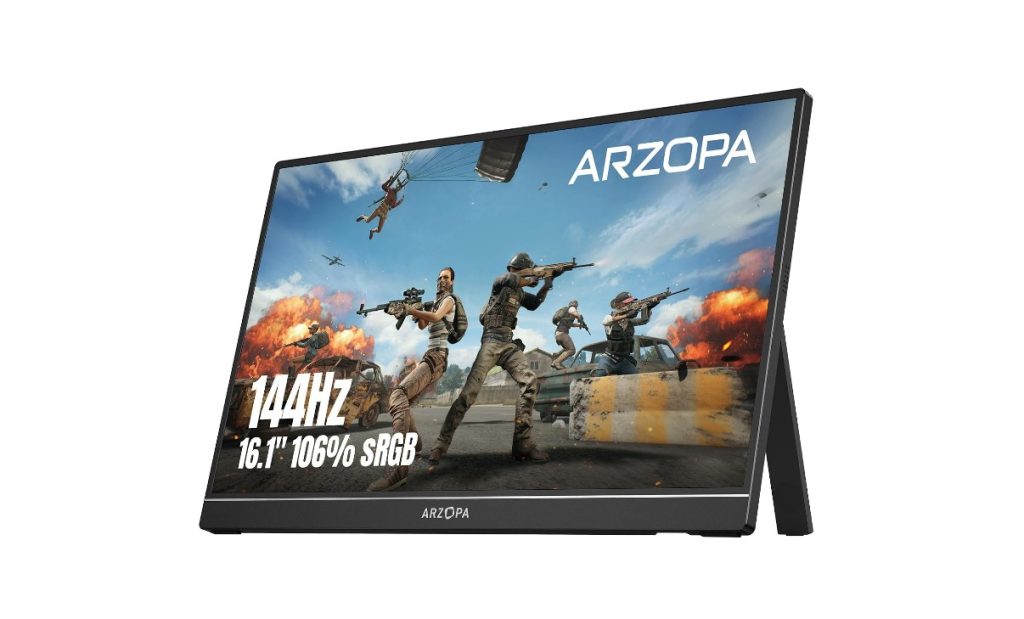

Quick answer: ARZOPA sells the same 1.5-pound chassis at three tiers, and the tier is the whole decision. The 2.5K 16:10 ($149.99) buys text sharpness for work and was October’s biggest commission. The 144Hz Z1FC ($129.99) buys motion for gaming, with the deepest review pool and a listing that honestly says no adaptive sync. The FHD 60Hz ($99.99) is the CNET-picked second screen for everyone else. The catch that crosses all three: these are power-negotiation devices — the pool’s worst reviews (a 20-unit fleet refusing new laptops, Xbox cycling, signal loss) are power-delivery mismatches in disguise, and none of the boxes include a case for a screen the drop casualty calls beyond fragile.
The three-product lineup
29 listings in the US feed — the monitor ladder plus sleeves and the 180Hz 2.5K experiment. October’s conversions ran across exactly these three tiers.

ARZOPA 16" 2.5K Portable Monitor
The resolution tier and this brand’s biggest October commission ($24.26). 2560×1600 at 16:10 — the aspect ratio that shows more spreadsheet rows and code lines — 123% sRGB, 1200:1 contrast, 350 nits, 1.46 pounds, 0.36 inches thin, dual USB-C plus mini-HDMI. The 60Hz panel is the trade: you are buying text and image sharpness, not motion. The pool’s work-from-outside owner says the nits keep up with the sun; the design student says the matte finish is what graphic-design recommendations push (she wanted gloss, took matte, is very happy anyway). This is the productivity listing of the three, and it converts like one.
- 2560×1600 at 16:10 — more vertical workspace than 16:9 1080p — the reason spreadsheet and code users buy it
- 350 nits, 123% sRGB, matte — the documented outdoor-readable brightness; design-school recommended finish
- 1.46 lb, 0.36 in — lighter than the 144Hz unit — the travel weight of the line
- 60Hz refresh — fine for everything except competitive motion — the honest tier trade

ARZOPA 16.1" 144Hz Portable Gaming Monitor
The motion tier and the volume listing at 4.4 over 2,637. 144Hz at 1080p with 106% sRGB — and, stated in the listing itself, no adaptive sync or Freesync. For the pool’s buyers that is the right trade: a ROG Ally X owner plays CS2 smooth as my dedicated monitor; an Xbox owner notes HDR looks great. The two caveats that repeat across four-star reviews: the kickstand is thin plastic that feels precarious, and the brightness setting resets to default on power cycles for at least one owner. At $129.99 this was October’s second ARZOPA commission, and the 2,637-rating pool is the deepest evidence base on this page.
- 144Hz, 106% sRGB, 1080p — the motion-clearity tier; no adaptive sync/Freesync, per the listing
- 4.4 over 2,637 — the line’s deepest review pool — the gaming tier’s track record
- kickstand feels precarious — thin plastic per multiple owners; a sleeve-protected setup is the norm
- brightness resets on power cycle — one owner’s recurring annoyance; re-set on each session

ARZOPA 16.1" FHD Portable Monitor
The budget tier and the CNET pick in the pool (an owner bought it at $77 on their recommendation and was very surprised and happy). 1080p at 60Hz, 100% sRGB, 1.7 pounds, 0.3-inch profile, an 80° adjustable kickstand that locks on uneven surfaces, two USB-C and a mini-HDMI, and a 24-month after-service window the other listings do not spell out. The college owner’s line is the honest pitch: better picture quality than my laptop, productivity ten times better, and with a cheap stand and a case you have a portable monitor to set up anywhere — including a ping-pong table in a basement. What you give up against the other two cards is 84% of the sRGB gamut and all of the motion and resolution tiers. At $99.99, that is the arithmetic.
- 1080p 60Hz, 100% sRGB — honest colors, honest motion — the $99.99 arithmetic
- 80° locking kickstand — stable on uneven surfaces per the listing, corroborated by owners
- 24-month after-service — the spelled-out support window on this specific listing
- no case included — the recurring note on all three: budget for a sleeve
Which panel, for which eyes
Same chassis, same ports, same no-case habit — the $50 steps between these listings buy exactly one thing each.
Work, code, spreadsheets — 2.5K 16:10 ($149.99)
2560×1600 text sharpness and 16:10 vertical workspace, 350 nits for outdoor tables. The productivity listing and October’s biggest ARZOPA commission.
Gaming and handhelds — 144Hz ($129.99)
1080p at 144Hz for ROG Ally, Steam Deck, Xbox and CS2. The deepest review pool (2,637) and the documented smooth as my dedicated monitor verdict.
A second screen, period — FHD 60Hz ($99.99)
The CNET-picked budget listing: better picture than most laptops, 24-month spelled-out service window, and everything after that is your laptop’s job anyway.
Side by side
Prices, ratings and rating counts from the brand’s affiliate feed at time of writing.
| 16″ 2.5K (Z1RC) | 16.1″ 144Hz (Z1FC) | 16.1″ FHD (Z1C) | |
|---|---|---|---|
| Price | $149.99 | $129.99 | $99.99 |
| Rating history | 4.3 · 1,145 | 4.4 · 2,637 | 4.4 · 1,159 |
| Resolution / refresh | 2560×1600 · 60Hz | 1920×1080 · 144Hz | 1920×1080 · 60Hz |
| Color / brightness | 123% sRGB, 350 nits | 106% sRGB | 100% sRGB |
| Weight | 1.46 lb | ~1.7 lb | 1.7 lb, 0.3 in thin |
| Documented catch | New-laptop USB-PD negotiation (fleet case) | Thin kickstand; brightness resets | Intermittent-use signal loss case |
| October conversions | 1 — $24.26 | 1 — $10.99 | 1 — $8.99 |
Not the right pick if… your laptop is a current-generation model and you cannot test one unit first. The fleet buyer’s one-star documents the pattern: 20 units that worked beautifully with previous-generation EliteBooks, all refusing the new G1i generation — pulling 9W briefly, then shutting off, while competitor monitors hold a stable 5W PD link. Power negotiation, not picture. If your deployment is new-hardware, budget a single test unit before the order.
Not the right pick if… you expected a case in the box. There is not one, on any of the three listings, and the pool’s owners source sleeves and bubble wrap on their own — the drop casualty lost a monitor in a padded bag from four feet. If your travel plan is backpack-tossing, the case is a required line item, not an accessory.
Not the right pick if… you wanted adaptive sync. The 144Hz listing says it plainly: no adaptive sync or Freesync. Competitive-frame buyers get the refresh rate but not the tear-free guarantee — the CS2 owner is happy regardless, but a VRR-dependent gamer should read that line before the five-stars convince them otherwise.
Not the right pick if… you expect the 2.5K’s sharpness and the 144Hz motion in one panel. At this brand’s price points the tiers are separate listings; the 180Hz 2.5K unit exists in the catalog at $169.99 but with a 4.1/466 record and 15% commission tier — we stayed with the three conversions October actually produced. The honest stack: pick the tier your eyes use, and do not pay for both.
Not the right pick if… your plan is console gaming without the right power supply. The Xbox owner is explicit: wrong supply, the screen cuts out and cycles; right supply, works fine. None of these listings ship a PSU. The monitor’s power budget and your console’s output have to agree — this is the category’s most common disguised failure, and it is solvable in one purchase.
What verified buyers say
Six verified Amazon reviews, paraphrased and attributed — the CS2 verdict, the four-foot drop in a padded bag, the cable rules from a two-year traveler, the fleet buyer’s 20 dead-then-alive units, the signal-loss rescue, and the Xbox power footnote.
The review that settles what $129.99 buys in 2026: he plays CS2 on it and the frames are smooth as my dedicated monitor was. Size reference he offers — like a huge laptop screen, which changes how you use a handheld console: he now carries this instead of squinting at the Ally’s 7 inches unless travelling. His other points are the honest ones the spec sheet skips: these are built with different internal components than regular monitors and don’t run the same board-frying risk his old monitor had, and get this if you only have money for a cheaper monitor — it beats standalone monitors at this price point even though it is not a 24-inch. Gaming tier validated by an owner who owns the premium alternative.
The durability line every portable-monitor buyer needs to read: great display, easy to connect, easy to transport — and beyond fragile. His was in a padded computer bag which fell from a 4-foot table onto the floor; no longer works. He is buying a replacement — his fault, he says — and also buying a roll of bubble wrap, because the smallest knock breaks it. His recommendation: strongly consider a padded case if purchasing, because one does not come in the box. That is the single most actionable sentence in the pool: none of the three listings include a case, and all three reviews’ owners ended up sourcing their own protection.
A two-year business-travel veteran of the 2.5K unit with the operational knowledge the listing does not contain. Rule one: keep the original monitor cable and do not toss it in a bin with the rest of your USB cables — it carries both power and video, and your nice braided USB-C probably does neither job; a random USB-C video cable may not deliver enough power. Rule two: the stand works in vertical mode, which is how he uses it, a little wobbly but it does the job. Rule three: no case in the box — he uses an old laptop sleeve. Every one of those three rules recurs across other reviews; this is the owner who wrote them down.
The most consequential one-star on the page, because it is a compatibility pattern, not a lemon. His company tested these with older HP EliteBook G8/G9 series — amazing, he would have given 5 stars, and they bought 20 of them. Then they upgraded to the new G1i-generation laptops: none of them work with the ARZOPA, while Asus ZenScreen and others work fine on the same machines. The ARZOPA briefly pulls about 9W from the ports then turns off; the other brands hold a stable 5W PD connection. If you are deploying against brand-new laptops, test one unit first — this is a power-delivery negotiation issue, not a brightness or picture issue.
The intermittent-use failure mode: a travel monitor used maybe 10–12 times since purchase, then one month it flashes on when connected and shuts off, refusing to detect the signal. She tried each of the cords; HDMI shows the monitor in display settings but the screen stays black. Her closing math is the part worth quoting: I realise it is not an expensive item but only working a handful of times makes it expensive. IT eventually got hers working — the lesson she draws is that this is not just a plug-and-go device, which is the honest counterweight to every plug-and-play bullet in the listings. Update your cables, your laptop’s USB-C firmware, and your expectations.
The console-specific footnote. If you don’t have the right supply it will not work — the screen cuts out and turns off and on. He runs the max supply the listing says it can handle and the Xbox works fine so far; picture quality is good, HDR looks great, and he is pretty impressed. The general rule this reveals, matching the fleet buyer above and the cable-keeping veteran: portable monitors are power-negotiation devices, and a huge share of this category’s one-star reviews are actually power-delivery mismatches wearing a monitor costume. Buy the power supply the listing specifies — it does not come with one.
Three desks these were made for
The hotel-and-office traveler
2.5K in the laptop sleeve (an old one, per the veteran), original cable kept separate and labeled, vertical mode for documents. Two years of business trips documented; the 16:10 ratio is the working-screen upgrade. Sunlight-readable at 350 nits for the outdoor-table meetings.
The handheld-console couch
144Hz between the ROG Ally and the couch: CS2 smooth as the dedicated monitor, a laptop-sized screen instead of 7 inches. The Steam Deck and Xbox owner’s power-supply note applies. This is the tier where $129.99 genuinely competes with desktop monitors.
The dorm and the basement
FHD 60Hz at $99.99 — the CNET owner’s impulse buy that worked, the student’s ping-pong table workstation, ten-times-better productivity with a cheap stand and a sleeve. For a first second-screen, this is the listing; the upgrades are still there when the major exists.
FAQ
Which ARZOPA should I buy for work?
The 2.5K listing. 2560×1600 at 16:10 gives you more vertical workspace than 1080p at 16:9 — measurably more spreadsheet rows and code lines — and 123% sRGB with 350 nits covers color-adjacent work and outdoor tables. It is also the tier that converted best in October’s affiliate data ($24.26). The 60Hz refresh is irrelevant to office work. If your work is motion — competitive gaming primarily — the 144Hz Z1FC at $129.99 is the listing, with 106% sRGB and the deepest review pool of the three. The $99.99 FHD is the honest budget answer when the laptop screen is the bottleneck, not the panel.
Why do these monitors fail for some people?
The pool’s failures cluster into power delivery, not panels. The fleet buyer’s 20 units worked with previous-generation laptops and refused new-generation ones — 9W then shutdown, while competitors held stable PD links. The Xbox owner saw cycling until the right supply went in. The intermittent traveler’s signal loss was rescued by IT. And the cable veteran’s rule prevents a whole subclass: the original cable carries power and video both; a random braided USB-C usually carries neither. Before blaming the monitor: original cable, correct PSU, and one test against a new laptop if you own one.
Are they durable?
As durable as a 1.5-pound glass sandwich, which is to say: the electronics hold up — owners report years of travel duty — and the physical package does not survive drops. The documented casualty: a padded computer bag falling from a 4-foot table, monitor dead, owner rebuying with bubble wrap. All three listings omit a case. The kickstand is thin plastic that works but feels precarious, and one owner’s brightness setting resets on every power cycle. Treat it like a laptop with no lid: sleeve it, do not check it, and it will outlast the review pool’s two-year veterans.
Do they really replace a dedicated monitor?
For travel and second-screen duty, yes — the pool’s owners replaced dedicated monitors, deployed 20-unit fleets, and stopped squinting at handheld screens. The honest limits: 16 inches is a laptop-class canvas, the speakers on all three are thin-lipped afterthoughts (one owner would rather they were omitted and the price dropped), and the gaming tier explicitly lacks adaptive sync. What the $99.99–$149.99 band buys is a screen that lives in a bag and beats any laptop’s built-in panel — the basement ping-pong-table owner’s productivity line is the honest ceiling claim.
What did October's buyers actually purchase?
All three tiers converted: the 2.5K at $24.26, the 144Hz at $10.99, and the FHD at $8.99 — one commission each, spanning the whole price ladder from $99.99 to $149.99. The pattern matches the review pool: this is a second-screen brand bought by people who already know exactly which tier their eyes need, with no single listing dominating. The catalog’s other listings (sleeves, the 180Hz 2.5K) did not convert in October’s data and we did not feature them.
How was this page put together?
We are an independent review site. Specs, prices and coupon states come from the brand’s official affiliate feed at the time of writing; ratings are the public Amazon rating history of each parent product. Review summaries are paraphrased from verified Amazon customer reviews of the three products above, one-star and three-star included — every quotation is attributed to the reviewer name shown and the month it was posted. If you buy through our links we may earn a commission; it does not change which reviews we quote or what they say.