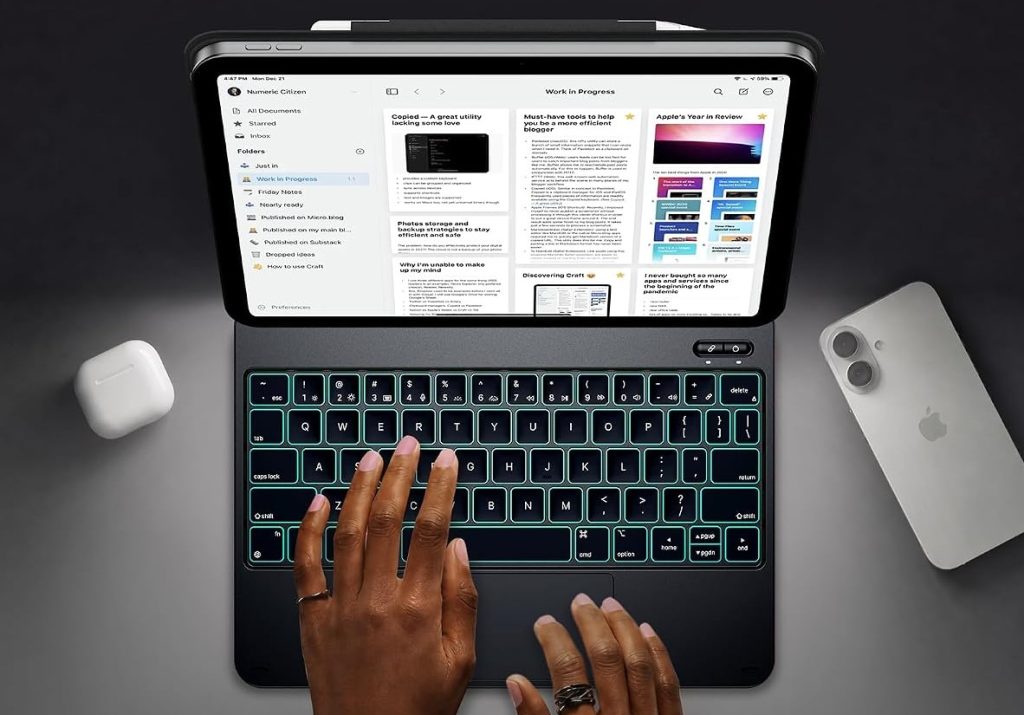

Quick answer: typecase is what you buy when the iPad is your computer but Apple’s keyboard economics aren’t. The Edge for iPad A16 ($79.99, 1,282 ratings) is the floating-style deck Apple refuses to make for the base iPad — Bluetooth-only (very little latency, but some), 12-month warranty in the box, and October’s $15.99 commission. The Studio for Air 11/Pro 11 ($79.99, 66 ratings) is the 4-way flip deck: laptop feel at a third of Apple’s price, with a documented sketch-mode pop-off for artists — zero October commission, disclosed. The 360 for iPad 13″ ($89.99, 2,477 ratings) is the deep-pool big deck: a pencil bay that recharges, a disable-able trackpad, and the weight every review mentions. Buy the deck that matches your iPad’s model number — the sizes are not forgiving.
The three-product lineup
The US feed runs 63 listings — keyboard decks by iPad model, plus the folios and sleeves. These three are October’s two conversions plus the deep-pool 13-inch flagship.

typecase Edge Keyboard for iPad A16 (11th/10th Gen)
October’s commission earner ($15.99) and the case Apple refuses to make: a cantilever-style floating keyboard for the base iPad, 4.4 over 1,282 ratings. The pool’s framing is exact — Apple only offers this style for Air and Pro; this Edge brings it to the A16 with strong magnets, a responsive scissor-switch deck and RGB backlighting. The honest edges: it connects by Bluetooth, not the Smart Connector pogo pins, so there is very little latency but some; the top key row sits partly hidden under the iPad’s lower edge; and one owner’s charging-port fit went loose after months (the USB-C wouldn’t click in). A 12-month warranty is in the box — one buyer registered it in minutes and was pleasantly surprised it existed.
- cantilever style for base iPad — the form Apple reserves for Air/Pro, brought to A16
- 12-month warranty, easy claim — in the box, registered in minutes — pool-verified
- Bluetooth, not pogo pins — very little latency, but some — the honest trade
- top row partly hidden — pool-repeated: keys tuck under the iPad’s lower edge

typecase Studio Keyboard for iPad Air 11 / Pro 11
The Air/Pro version of the same idea, 3.9 over 66 ratings — a newer listing whose October conversion came in at zero commission (disclosed; readers bought it, so we cover it). The deck: scissor-switch keys with satisfying travel, 11 backlight colors, a large trackpad, and the 360-degree flip into viewing and sketch modes — the pool’s phrase: a true laptop feel without paying the steep price tag of Apple’s first-party accessories. The honest edges at 3.9: no true tablet mode (one buyer expected one), the white-key legends are hard to read in dim light, edges of the iPad stay exposed, and one one-star documents the magnetic sketch mode popping the iPad off under screen pressure. Bluetooth pairs in seconds and holds.
- 4-way flip + sketch mode — laptop feel, 11 backlights, big trackpad — the pool’s phrase
- zero commission disclosure — October’s conversion paid us $0 — covered anyway
- white key legends hard to read — pool-repeated dim-light complaint at 4 stars
- sketch-mode pop-off case — the one-star’s pressure test, quoted straight

typecase 360 Keyboard for iPad 13" / 12.9" with Trackpad
The 13-inch tier with the deep pool: 4.2 over 2,477 ratings, full 360-degree swivel, backlit keys and a built-in Apple Pencil holder that recharges the stylus in place — the pool’s most-loved single feature. The comparison class the pool keeps invoking: the $400 Apple combo, the Zagg that flops without its keyboard, the ESR whose trackpad couldn’t be disabled. This one’s trackpad can be turned off (the pool confirms — a buyer checked with the company before ordering), the swivel hinge is strong enough to need two hands, and one owner found the replacement for a failed unit better than the original. The honest edges: it is heavy — every review says so — and pale key legends strain older eyes.
- pencil holder + recharge — the pool’s most-loved single feature on the 13″ deck
- trackpad can be disabled — confirmed with the company pre-purchase — the ESR fix
- heavy — every review says so — the known trade at $89.99 vs $400 Apple
- replacement better than original — one warranty case turned a 2-star into 4
Which deck, which iPad
One keyboard house, three iPad targets. Match the deck to the machine in your bag — the sizes are not interchangeable.
Base iPad A16 — Edge ($79.99)
The floating style Apple reserves for Air/Pro, brought to the base iPad. Bluetooth-only, 12-month warranty in the box. October’s $15.99 earner.
Air 11 / Pro 11 — Studio ($79.99)
The 4-way flip deck: laptop feel, sketch mode (with a pop-off caveat), 11 backlights. Zero October commission — disclosed.
iPad 13″ / 12.9″ — 360 Trackpad ($89.99)
The deep-pool big-screen deck: pencil holder that recharges, trackpad you can disable, heavy as the trade. 2,477 ratings of evidence.
Side by side
Prices, ratings and rating counts from the brand’s affiliate feed at time of writing.
| Edge (iPad A16) | Studio (Air 11/Pro 11) | 360 (13″/12.9″) | |
|---|---|---|---|
| Price | $79.99 | $79.99 | $89.99 |
| Rating history | 4.4 · 1,282 | 3.9 · 66 | 4.2 · 2,477 |
| Style | Cantilever/floating | 360 flip + sketch | 360 swivel + pencil bay |
| Pencil charging bay | — | — | Yes |
| Trackpad | Yes | Yes, large | Yes, disable-able |
| Documented quirk | Top row hidden | Sketch-mode pop-off | Heavy — every review |
| October conversions | $15.99 | $0 (disclosed) | — |
Not the right pick if… you’re a digital artist who presses the screen. The Studio’s sketch mode has a documented failure mode: the one-star’s iPad pops off the magnetic slot when you apply pressure to the screen — exactly what drawing does. Typists report the same deck as a true laptop feel. The 13-inch 360’s swivel hinge is strong enough to need two hands to open, which reads as solid to typists and hostile to sketchers. Buy a folio if the pencil is your main tool.
Not the right pick if… weight is the deal. Every single 13-inch review says it: the case is heavy. The base-iPad Edge is lighter but the pool notes the iPad then weighs more than a laptop once decked — one one-star’s exact complaint, with a screen-shake-when-typing note attached. None of these decks compete with a bare tablet for hand comfort; you’re building a laptop, not protecting a slab.
Not the right pick if… your eyes read key legends in dim rooms. The white-on-white key legends are a repeated complaint — extremely difficult for me to read/see, per one four-star who otherwise calls the unit fantastic. The RGB backlighting helps, but the legends themselves are the constraint. Keys that are easy to label-blind are keys that annoy nightly.
Not the right pick if… you expected Smart Connector latency. The Edge connects by Bluetooth only — Apple’s pogo pins sit unused — so there is very little latency, but some, plus the sleep/wake function has a documented case of the deck staying lit after the case is closed. Millisecond matters to gamers and musicians; typists and students won’t notice. Buy by your tolerance.
What verified buyers say
Six verified Amazon reviews, paraphrased and attributed — the case Apple won’t make, the sleep/wake audit, the laptop-feel student, the sketch-mode pop-off, the Apple-folder comparison, and the ESR/Zagg refugee’s homework.
The framing review. 4.3 stars in his own math (rounding up because this keyboard delivers). Disappointing that Apple does not offer a cantilever-style keyboard for the base iPad, just for the Air and Pro — he wanted this style while using the pogo pins for low latency. This Typecase Edge does NOT utilize that connection: some latency (very little) through the Bluetooth. Waited months before reviewing — construction good quality, appearance lovely, and as a light-to-moderate typer the magnet holds the iPad firmly, even through a thin TPU skin.
The iPad-veteran’s audit. Used iPads since they were unleashed; keyboards are the first thing he adds. This one is really good — with two edges: closed the iPad on a table and come back 10 minutes later and the keyboard is still lit up — questioning the auto sleep/wake; and the upper row of keys are somewhat hidden below the lower edge of the iPad making them hard to access. Agreed with other reviews, not a deal breaker. The honest two-blemish review from a 15-year iPad user.
The value review. Wanted something that would give the tablet a true laptop feel for writing, studying and daily browsing without paying the steep price tag of Apple’s first-party accessories — exceeded expectations. Bluetooth pairing takes only a few seconds, the connection stays stable and responsive without lag; the scissor-switch keys offer a satisfying amount of travel; the 11 backlight colors are a wonderful touch for low-light work. The full package named in one sitting.
The honest floor, quoted straight. My iPad always falls off of the case — it drives me crazy! Also the ‘drawing’ set up is terrible: the iPad doesn’t stay in the slot, it just pops the iPad off when you apply pressure to the screen. Against a 3.9 over 66, this is the documented failure mode for sketchers and heavy screen-pressers. Typists love it; artists should read this one twice before buying.
The comparison-class review. Very well constructed — the built-in pencil holder is nice (it recharges the stylus in place). Surprised by the build quality and features for the price: better than the keyboard folder I bought from Apple for $250.00. The pool’s whole value thesis in one line: the pencil-holding, backlit, swiveling deck at a third of Apple’s folder price.
The shopping-saga review. The first (ESR) had a trackpad that could not be turned off nor sensitivity-adjusted, so the cursor bounced around and shut down apps mid-type. The second (Zagg Pro Keys 2) was very heavy and hard to use without the keyboard. Before buying this one, I confirmed with the company that the trackpad can be shut off. After 10 minutes of using it, I’m loving it — keyboard similar to the Zagg, easy to type on, backlight with color selection, and I can spin the screen around and fold it up. The homework-first buyer’s verdict.
Three users these were made for
The base-iPad student
A16 in hand, no $250 Apple folder budget: the Edge’s floating deck, 12-month warranty, RGB for dorm-room typing. October’s $15.99 commission studied here.
The Air/Pro note-taker
Notes in lecture, laptop feel at a third the price: the Studio’s 4-way flip and seconds-fast pairing. The sketch-mode caveat is for the artists, not the typists.
The 13-inch road warrior
Pencil in the recharging bay, trackpad off when writing, the 360 swivel for clients: the deep-pool big deck, heavy and proud of it. ESR and Zagg refugees documented.
FAQ
Which typecase fits my iPad?
Sizing is the whole game here: the Edge targets the iPad A16 (11th/10th gen base iPad) — one buyer initially ordered the 10.9″ version and had to return it for the 11″; the Studio targets iPad Air 11 and Pro 11; the 360 targets the 13″/12.9″ machines. Check the listing’s exact model list against your iPad’s model number, not its screen inches — the pool’s return stories are mostly size misses, not quality misses.
How do these compare to Apple's keyboard?
The pool’s short version: at a third the price you get the pencil bay (13″ deck), the backlighting, and a build quality that surprised an owner of Apple’s $250 folder. What you trade: Smart Connector latency (these are Bluetooth — very little, but some), Apple’s key feel polish, and Apple’s weight engineering — every review calls these heavy. The 12-month warranty on the Edge is the safety net Apple doesn’t need to offer.
Is the trackpad any good?
Good enough that it’s the deciding feature for refugees: one buyer fled an ESR whose trackpad couldn’t be disabled (the cursor bounced around and shut down apps mid-type) and confirmed with typecase before buying that this one can be turned off. The honest edges: the velocity clicking can be squirrely (one owner enabled tap-to-click and accepts the errant clicks), and a Bluetooth wake can take several key presses on a bad morning. For $89.99 vs. Apple’s trackpad: not close, not $400 either.
What about the sketch and drawing modes?
Split verdict, quoted honestly: typists love the 4-way flip; the one-star’s iPad popped off the magnetic slot when pressing the screen — the exact motion of drawing. The 13″ deck’s swivel hinge is strong (two hands to open, per the pool). If the Apple Pencil is your primary tool, the 360’s recharging pencil bay is the artist-friendly feature; the sketch modes on the smaller decks are compromises.
Are there reliability concerns?
The documented edges: a charging port that stopped clicking in after months on one Edge (it still charges, just loosely, with battery-percent readouts that drift); a sleep/wake function that left one deck lit after closing; and one buyer whose warranty replacement unit was actually better than the original. The 12-month warranty on the Edge is real and easy to claim — the pool’s insurance story. Register it the day the box opens.
How was this page put together?
We are an independent review site. Specs, prices and coupon states come from the brand’s official affiliate feed at the time of writing; ratings are the public Amazon rating history of each parent product. Review summaries are paraphrased from verified Amazon customer reviews of the three products above, one-star and three-star included — every quotation is attributed to the reviewer name shown and the month it was posted. If you buy through our links we may earn a commission; it does not change which reviews we quote or what they say.