
Quick answer: FLYDIGI packs hall-effect sticks, tension rings, and hair triggers into controller prices that undercut the $90 rivals, and the honest rule is buy the feature you’ll actually remap. The Direwolf 4 ($39.99) is the default answer — it ended one reviewer’s months-long search against $80-90 controllers. The Vader 5 Pro ($79.99) is the remapper’s dream, “as close to perfect for MMOs as a controller can get” — with a weird USB bug documented. The Vader 5S ($59.99) is the wired Xbox value stack, if you don’t chat through a wired headset (the pool’s most repeated failure).
The three-product lineup
One feature philosophy, three prices. Prices are feed values at time of writing.

FLYDIGI Direwolf 4
The pool’s sleeper hit and the easiest recommendation in this article: $39.99, hall-effect sticks, tension rings, hair-trigger switch, gyro, wireless — features reviewers keep comparing to $80-90 rivals and finding no reason to pay more. The documented wins: “the easiest time I’ve ever had lining up headshots” (Resident Evil 4 mercenary mode as the test bench), 1-for-1 Xbox ergonomics, batteries that last “a really long time,” drops survived without issue, and one owner concluding months of searching at “this FLYDIGI is better” than the name brands. The honest boundaries: it feels light, which some read as cheap (a recurring first-impression complaint that usage erases), the D-pad divides opinion, long sessions hurt one reviewer’s thumbs (joystick placement vs his hands), and the software needs patience to figure out which version matches your unit. At $40, the answer to “which controller should I buy” starts here.
- $39.99 with the full feature stack — hall sticks, tension rings, hair trigger, gyro, wireless
- Xbox-identical ergonomics — the 1-for-1 shape Xbox refugees keep praising
- months-of-search verdict — the closer: ‘this FLYDIGI is better’ than $80-90 rivals
- light-first feel + software maze — reads cheap at first touch; software versions confuse

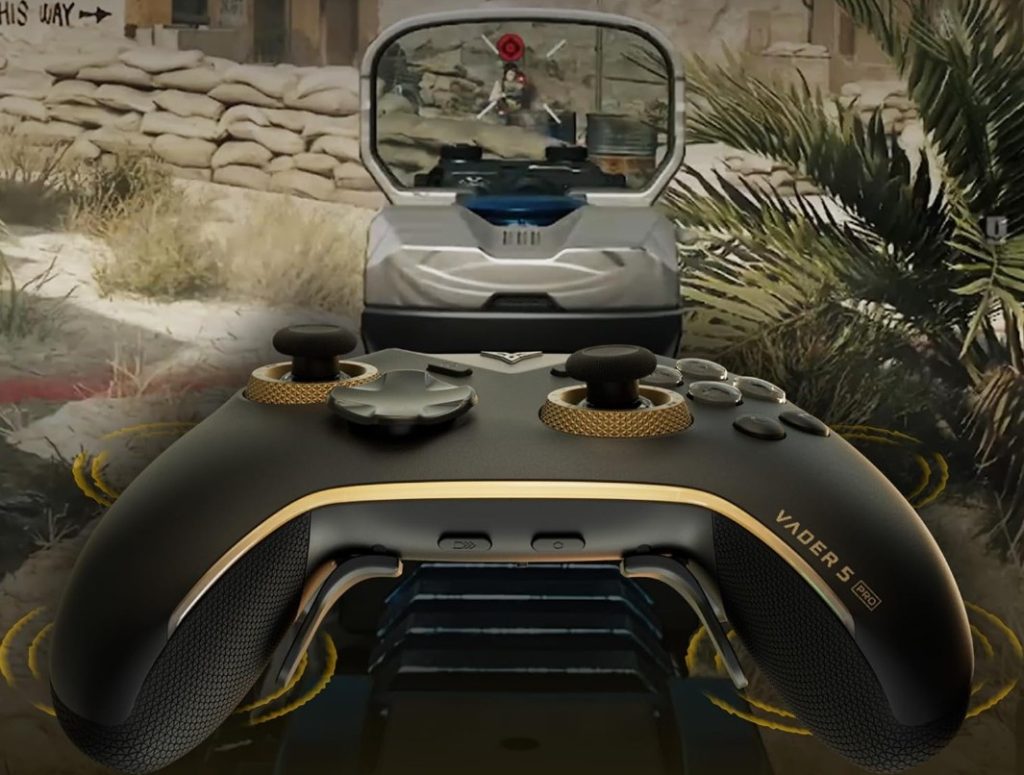
FLYDIGI Vader 5 Pro wireless PC controller
The flagship, and the pool’s theme is software depth: every button remappable to mouse, keyboard, or macros — “as close to perfect for MMOs as a controller can get,” from an owner who runs it like a second keyboard. The hardware earns the praise too: hall-effect sticks with adjustable tension rings (the drift-prevention feature one owner calls “insane”), analog triggers that go clicky at the flip of a switch, 8 extra buttons, plug-and-play connection, and an app-plus-web-interface choice for configuration. A Razer Wolverine Tournament owner replaced it at half the price, wireless, calling this “fantastic replacement” with the extra bumpers he needed. The honest boundaries: it shrank slightly versus the Vader 4 Pro (hands-first buyers beware), one unit buzzes and plays USB disconnect sounds when powered off while plugged in, and Windows-key shortcuts don’t always map. And no touchpad — the MMO crowd’s one wish.
- everything remappable — mouse/keyboard/macros per button — the MMO controller’s real trick
- hall sticks + tension rings — drift prevention documented as ‘insane’ by the pool
- clicky trigger switch — analog-to-short-throw at the flip — racing and FPS both covered
- smaller than Vader 4 Pro — and USB-disconnect sounds on one unit — know before buying

FLYDIGI Vader 5S wired controller for Xbox/PC
The wired value play, and its review pool is the most honest tug-of-war in this article: a 4.3 average where the 3-stars keep saying “I love this controller, but…”. The love list is long — stick tension adjustment, swappable taller sticks, extra shoulder bumpers for a paddle-shifter feel in driving games, clicky trigger switches better than any deadzone hack, solid build. The “but” list is why it’s second: multiple owners report wired-headset microphones not passing through (“attempted 4 different wired microphones, three hours of troubleshooting”), a right stick that started drifting after a week despite the no-drift marketing, a unit dead after nine careful days, software stuck at a failed-update loop, and full-left steering that doesn’t register fully in racing games. Xbox-first buyers get genuine value; PC-only buyers should weigh the Vader 5 Pro instead.
- the $59.99 feature stack — tension rings, swappable sticks, bumpers, clicky triggers
- Xbox Series X|S + PC — official Xbox layout ergonomics, wired reliability
- wired headset mic may not pass — the pool’s most repeated failure — chat needs another controller
- early-life QC reports — drift after a week, DOA in nine days — keep the return window open
Who each FLYDIGI is for
The split is what you connect to and how much software you want — the features are the same philosophy at three prices.
The “just tell me what to buy” PC gamer — Direwolf 4 ($39.99)
The default answer: hall sticks, tension rings, hair trigger, gyro, wireless, Xbox ergonomics. Software needs patience; hands bigger than average should try the grip first.
The remapper — Vader 5 Pro ($79.99)
MMO players, accessibility setups, macro lovers. Every button is mouse/keyboard/macros if you want it. Wireless, clicky trigger option, web or app config.
The Xbox-first value hunter — Vader 5S ($59.99)
Official Xbox ergonomics wired, with the tension-ring and bumper stack. Chat users: the wired headset mic boundary is real — plan your audio path before buying.
Side by side
Prices and ratings from the brand’s affiliate feed at time of writing.
| Direwolf 4 | Vader 5 Pro | Vader 5S | |
|---|---|---|---|
| Connection | Wireless (PC) | Wireless (PC/phone) | Wired (Xbox/PC) |
| Signature feature | Price-to-features at $39.99 | Full remapping + macros | Xbox layout + tension rings |
| Best documented win | Ended a months-long search vs $90 rivals | “Close to perfect for MMOs” | Paddle-shifter bumpers, clicky triggers |
| Documented weakness | Light feel; software maze; long-session hand pain | USB bug; smaller than Vader 4 | Mic passthrough fail; early-life QC |
| Price | $39.99 | $79.99 | $59.99 |
| Rating history | 4.5 · 214 | 4.1 · 517 | 4.3 · 632 |
Not the right pick if… you game on console ecosystems expecting plug-and-play. These are PC-first devices: the Direwolf and Vader 5 Pro reviews are PC stories, and the Vader 5S is the only one with official Xbox Series X|S support. Switch and PlayStation owners belong to other aisles — the pool says so by absence.
Not the right pick if… you chat through a wired headset on the Vader 5S. Multiple owners, independently: four different wired microphones, three hours of troubleshooting, no mic passthrough — while the controller’s own on-the-fly input/output adjustments didn’t help. One bought a second controller just for chat. Wireless headsets dodge the issue.
Not the right pick if… zero-setup is your requirement. The pool’s consistent footnote is software: figuring out which app version matches your unit, an update loop that refused to finish on one Vader 5S, and Windows-key shortcuts that don’t always map on the Pro. Hardware is plug-and-play; the features require the app.
Not the right pick if… you need big-hand ergonomics or marathon sessions by default. The Vader 5 Pro shrank slightly from the 4 Pro, one Direwolf owner gets thumb and palm pain in long sessions, and another first impression is “feels light, feels cheap” (usage erases it, but first touch matters). Try before the tournament.
Not the right pick if… you won’t use the return window. The early-life QC reports are documented and non-universal: a Vader 5S stick sticking after three weeks, a dead unit at nine days, drift “after a week” despite the marketing. The 4.1-4.5 averages are real — and so is the roulette. Buy where returns are easy.
What verified buyers say
Six verified Amazon reviews, paraphrased and attributed — weighted toward the boundary-setting reviews this category needs most.
The closer review: months spent trying the best-known brands at $80-90, then finding this does the job better. His case: it doesn’t try to do too much, the battery lasts “a really long time,” extra buttons sit where accidental presses are rare, and the software — once you figure out which version fits your unit — handles the rest. The search is over, in his words.
The performance test: Resident Evil 4 Remake’s mercenary mode as his barometer, and the result was “arguably the easiest time I’ve ever had lining up headshots on any controller.” Didn’t expect to love the tension rings, but the fine-tuning made the difference. Tried the Mobapad Chitu Silent Edition alongside — preferred this one’s ergonomics.
The fair 3-star: “probably the best, feature rich controller at its price point” — sticks accurate and nimble, hair trigger easy, tension ring unusual at $40, material doesn’t feel cheap. Then the honest tax: after long sessions his thumbs and palms hurt — joystick placement and grip geometry don’t fit his hands. Feature lists don’t include your palm; try before you trust a 4.5 average.
The remapping deep-dive: every button assignable to mouse, controller, keyboard, or macros makes it “as close to perfect for MMOs like WOW Forever as a controller can get.” Sticks are the highlight with adjustable tension per game, 8 extra buttons, solid connection, easiest setup he’s had. The one wish: a touchpad. PC-only verdict from an owner who never left the ecosystem.
The specific defect report: power off while the charging cable stays plugged in and the PC plays the USB disconnect sound — and the controller physically shakes while off. Power on while plugged in and both repeat. He suspects hardware or software and says so; the controller is otherwise good. The smaller gripe: it shrank a little versus the Vader 4 Pro. Niche bug, real annoyance, documented honestly.
The QC story that keeps the 4.3 average honest: three weeks of genuinely loving it — “a really nice controller” — then the right stick started registering pushed-down with nobody touching it. His advice is the practical one: buy it with warranty coverage and you’ll be fine; without it, the early-life failure risk is real. No hate in the review, just the math.
Three setups these controllers fix
The couch PC
Steam from the sofa, no desk in reach. The documented win: a $39.99 controller that ended a months-long search — hall sticks, no drift, wireless that doesn’t drop.
The MMO second screen
WOW Forever macros on a controller, because hands hurt on the keyboard. The documented win: every button remapped to mouse or keyboard — “close to perfect” per the pool.
The Xbox-shaped hand
You like the official layout and want hall-effect sticks without $180 prices. The documented win: 1-for-1 Xbox ergonomics with tension rings — on wireless at $40 or wired Xbox at $60.
FAQ
FLYDIGI Vader 5 Pro or Direwolf 4 — which for PC gaming?
Buy the Direwolf 4 unless remapping is the reason you’re shopping. The Vader 5 Pro’s edge is software: every button remappable to mouse, keyboard, or macros — genuinely ‘close to perfect for MMOs’ per one owner — plus the clicky trigger switch and multi-device flip. The Direwolf covers the hardware core at $40 less: hall sticks, tension rings, hair trigger, gyro, wireless, Xbox-identical ergonomics, and the pool’s best value verdict (‘this FLYDIGI is better’ than $80-90 rivals). If you’d never open the app, the Pro’s software depth is wasted money.
Is the stick drift problem real on these?
The hardware design is anti-drift — hall-effect sticks plus adjustable tension rings, which one owner calls ‘insane’ drift prevention — but the QC reports exist and they’re specific: a Vader 5S right stick that started registering input after a week despite the marketing, and full-left steering that under-registers in racing games on another. The pattern reads as unit-level QC, not design failure — the 4.1-4.5 averages and multi-week zero-drift reports support that. Practical protocol: test all stick extremes in week one and buy from a frictionless return seller.
Why do Vader 5S owners complain about microphones?
The wired headset path: multiple owners independently found wired-headset mics don’t pass through the controller to the console — chat inaudible to teammates — with one tester trying four different microphones over three hours and the controller’s own audio adjustments never helping. Game audio works fine; it’s the mic side that fails. Workarounds from the pool: use a wireless headset, plug the headset into the console/PC directly, or keep a second controller for voice chat. If chat is your primary use, this is a dealbreaker-shaped boundary.
How is the software?
Capable but fussy. The Vader 5 Pro offers both an app and a web interface for remapping, profiles, and trigger modes — the MMO reviewer runs it like a second keyboard. The friction is versioning and stability: figuring out which app build matches your controller unit, one Vader 5S stuck in an update-restart loop at the same version, and Windows-key shortcuts that don’t always map. Direwolf owners describe the software as ‘a pain in the butt to figure out which version works’ — solvable, just not polished. Budget an evening for setup.
Does the Vader 5 Pro work with Xbox or PlayStation?
It’s a PC (and phone) controller — the pool’s reviews are PC stories, one explicitly saying ‘for other systems I don’t know because I have only used it for PC,’ and the Xbox-layout shape is ergonomics, not licensing. For native Xbox Series X|S, the Vader 5S wired is the officially-supported option in this lineup; PlayStation owners aren’t addressed by any of the three. The Direwolf’s gyro is PC-consumed, not Switch-consistent — check FLYDIGI’s current compatibility table before assuming.
How was this page put together?
We are an independent review site. Specs, prices and coupon states come from the brand’s official affiliate feed; review summaries are paraphrased from the public Amazon review history of each product, negative reviews included. If you buy through our links we may earn a commission — it does not change which reviews we quote or what they say.