
Quick answer: Nelko is a tape economy wearing a printer costume — the machines are cheap because the cartridges are the business, and the pool’s most economically literate owner documents both sides. The P21 ($20.99) is the flagship: 4.4 over 25,172 ratings, tape so much cheaper than Brother’s Tz cartridges that crafters call it an absolute treasure — with an RFID lock on official paper whose green-sticker workaround is community knowledge. The PM220 ($32.99) buys 2-inch tape widths and PC support, carrying the pool’s only concentrated failure pattern. The PP01 photo printer ($79.99) is the non-label arm — 2×3 sticky prints whose fixed 45×58 mm printable area one owner measured and objected to. October’s commissions ran all three lines, which is the catalog working as designed.
The three-product lineup
161 listings in the US feed — the P21 family, the PM220, the photo printers, the 4×6 shipping-label thermal line, and the label tape consumables themselves. These three are October’s conversion set.

Nelko P21 Label Maker
The catalog’s flagship and one of Amazon’s biggest label-maker pools: 4.4 over 25,172 ratings at $20.99. Screenless and buttonless — everything is designed in the phone app (Bluetooth, 3600+ icons, 750+ templates) and printed by direct thermal at 203 DPI, no ink or toner. The owner base is teachers, crafters and home organizers, and the reviews converge on the economics: one owner replaced a Brother labeler whose Tz cartridges were getting tedious, time-consuming and expensive, and calls this an absolute treasure at $17. The catch that matters is the business model: the P21 reads an RFID tag on the tape roll and officially wants Nelko-brand paper (the listing recommends it in bold); the pool documents the workaround — peel the green sticker off an empty roll onto a generic refill and the printer believes it. The label sizes are fixed (14×40, 14×50, 14×75 mm), and continuous tapes are not supported.
- 4.4 over 25,172 ratings — the flagship pool — and October’s converter at the $2.20 tier
- no screen, no buttons, app-designed — half the weight and size of a traditional labeler; hold the power button 3 s to wake
- RFID tape lock, sticker-workaround documented — officially Nelko paper; the pool’s refill trick is one green sticker
- fixed label sizes, no continuous tape — 14×40/50/75 mm — check your use case fits before buying

Nelko PM220 Label Maker
The bigger brother for people whose labels outgrow the P21: 23–54 mm tape widths (0.91–2.12 inches — the reason one owner upgraded), 203 DPI direct thermal, a driver and app for PC as well as iOS and Android (via nelkoprint.com — note the listing’s own warning: do not connect via Bluetooth for PC), 90+ fonts and 450+ materials, plus the AI features — text-to-image, background removal, OCR — that one owner tolerates as an option and would dislike as a subscription. The honest failure note in the pool: an overnight battery drain (about 20% of charge lost per night) that customer service resolved for one owner, and a two-units-shut-down-after-a-third-of-a-label case that one buyer read as a deliberate disabling feature. Battery quirks are this model’s documented tax; support outcomes run hot-and-cold around them.
- 23–54 mm tape, PC + phone — the width ceiling the P21 cannot reach — the documented upgrade reason
- 203 DPI thermal, no ink — same engine as the flagship; calibration button on the right side before first print
- AI features: optional today — text-to-image, background removal, OCR — an option until it becomes a subscription, per one wary owner
- overnight battery drain documented — one resolved by customer service; the model’s known quirk

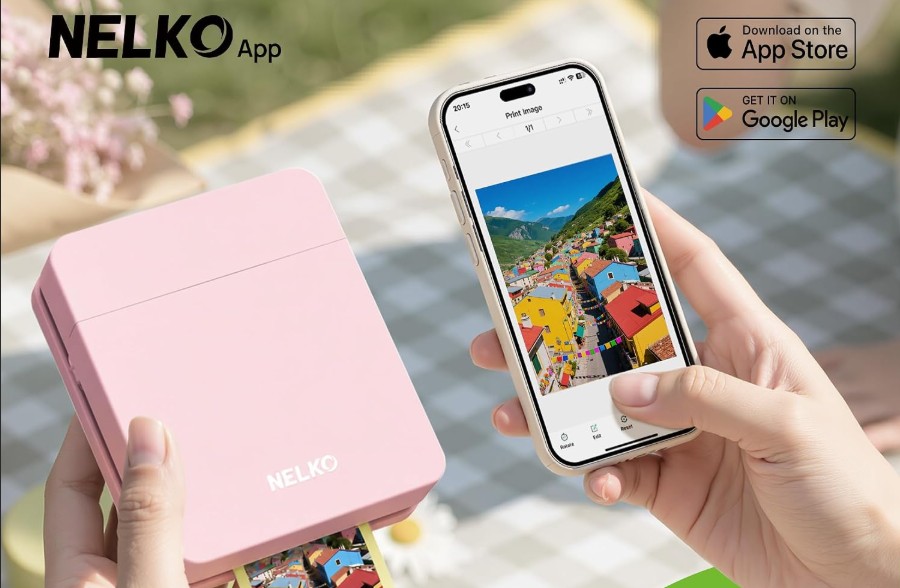
Nelko PP01 Photo Printer
The catalog’s non-label arm: a pocket-sized inkjet (308 g) printing 2×3-inch photos on sticky-backed, smudge- and tear-resistant paper at 600 DPI, each cartridge good for about 80 full-color prints. Bluetooth to the Nelko app, edits and frames in-app, a print in under 90 seconds. The pool’s owners are scrapbookers, planners, dog-photo people and small businesses making instant giveaways. The honest boundary, from the four-star that matters: the paper is 52.3×90 mm but the printable area is fixed at 45×58 mm — you cannot change it, and the unprintable margin is a waste of photo paper that annoyed her enough to say so at length. Also documented: the ink cartridge needs occasional cleaning if the printer sits unused (one owner uses eyeglass-cleaner wipes, per the manual’s instructions), and it is inkjet — not the zero-consumable thermal economics of the label line.
- 2×3" sticky-backed inkjet, 600 DPI — the scrapbook and journal format; prints in under 90 seconds
- ~80 photos per cartridge — inkjet consumables — the economics that separate it from the thermal label line
- printable area fixed at 45×58 mm — on 52.3×90 paper — the documented margin waste, unchangeable
- cartridge cleaning if idle — eyeglass wipes per the manual; the cost of an inkjet that sits between projects
Which printer, for which label
Two label engines and one inkjet, all app-driven. The width of what you print decides the machine — the tape economics decide the rest.
Home, school, small labels — P21 ($20.99)
14×40 to 14×75 mm labels, 25,172 ratings, the tape economy that beat Brother. The RFID lock has a documented workaround; the machine itself is the safest bet in the catalog.
Wider labels and PC workflow — PM220 ($32.99)
23–54 mm tapes, PC driver support, AI features. The width ceiling — with the model’s documented battery quirk and the sudden-death cases to weigh.
Photos, not labels — PP01 ($79.99)
2×3 sticky prints at 600 DPI for scrapbooks, planners and pet-photo people. Inkjet cartridge economics (~80 prints), fixed printable area, idle-cleaning habit.
Side by side
Prices, ratings and rating counts from the brand’s affiliate feed at time of writing.
| P21 label maker | PM220 label maker | PP01 photo printer | |
|---|---|---|---|
| Price | $20.99 | $32.99 | $79.99 |
| Rating history | 4.4 · 25,172 | 4.3 · 3,488 | 4.2 · 1,749 |
| Print tech | Direct thermal, 203 DPI | Direct thermal, 203 DPI | Inkjet, 600 DPI |
| Label / paper size | 14×40/50/75 mm, fixed | 23–54 mm (0.91–2.12″) | 2×3″ paper, 45×58 mm printable |
| Connects to | iOS/Android (not Pixel/Android 14; no PC) | iOS/Android + PC driver | iOS/Android |
| Consumable economics | Nelko tape, RFID-locked; sticker workaround documented | Nelko tape, off-brand wished | Ink cartridge ~80 prints + paper |
| October conversions | 1 — $2.20 | 1 — $4.58 | 1 — $11.99 |
Not the right pick if… you want generic tape out of the box. Both label machines read an RFID tag on the roll and officially expect Nelko-brand paper — the listing says so in bold, and one PM220 owner’s one wish is off-brand labels because there’s a better selection. The pool’s documented workaround (transfer the green sticker from an empty official roll to a generic refill) works but is a hobby, not a feature. If tape freedom is a hard requirement, the Dymo/Brother ecosystems trade cartridge price for exactly that openness — and the Brother owner’s review above shows the trade running the other way.
Not the right pick if… your phone is a Pixel on Android 14 or you need PC support from the P21. The flagship’s own bullets: not compatible with Google Pixel phones running Android 14, and this label maker doesn’t work with computers. The PM220 is the PC path (with the driver from nelkoprint.com — and do not connect it to the PC over Bluetooth, per the listing). The PP01 is phone-only as well. This is an app-first catalog; check the compatibility line before the box.
Not the right pick if… continuous tape or custom-length labels are the requirement. The P21’s label lengths are fixed — 14×40, 14×50, 14×75 mm and siblings — and continuous label tapes are not supported, stated in the listing’s own notes. The PM220 handles more widths but is still roll-based. Address labels and shipping labels at custom lengths want a different product class entirely (Nelko’s own 4×6 thermal shipping printers are in the feed, but did not convert in October and we did not feature them).
Not the right pick if… the PM220’s failure pattern worries you. Two owners — a repeat four-unit buyer — document identical sudden deaths at a third of a label, and his inference of a deliberate disabling feature is at least a firmware-lock hypothesis the pool cannot rule out; the battery’s overnight 20% drain is the model’s other documented quirk. The P21’s 25,172-rating pool has no equivalent concentrated death pattern. If the labeler is business-critical, the flagship is the machine; the PM220’s widths are its only argument.
Not the right pick if… you expected the photo printer’s 2×3 prints to be 2×3. The paper is 52.3×90 mm; the printable area is fixed at 45×58 mm — a border you cannot remove, which one scrapbooker calls a waste of photo paper. And the PP01 is an inkjet: cartridges (~80 prints each) plus paper, with idle-cleaning cycles if it sits between projects. The label line’s zero-ink thermal economics do not transfer to the photo line — the two catalogs have different running costs, and the box art does not say so.
What verified buyers say
Six verified Amazon reviews, paraphrased and attributed — the RFID lock and its sticker workaround, the treasure-at-$17 economics, the feels-cheap consensus, the battery drain customer service fixed, the double sudden death, and the print area one owner measured.
The most economically literate review in the pool. He was shipped the older box but the machine still reads the RFID that identifies what size official Nelko replacement tape is loaded: pop in the tape, press power twice, and it auto-sets the label roll. Because of the RFID, you can only use official Nelko paper replacements — and then he documents the workaround without apology: peel the green sticker off an empty roll and put it on a generic refill, and it will work since it thinks it’s genuine. He also notes the ink question: instead of expensive ribbons, it does some type of thermal something. That review is the ownership manual the box does not include.
The flagship economics, from a crafter who ran the comparison. He was using a Brother label maker for marking crafting parts and pieces, and the process was getting tedious, time consuming, and expensive with the cost of Tz cartridges. The Nelko P21: fantastic, labels very affordable, app straightforward, fonts and graphics customizable, a large variety of premade labels easily modified. His one wish — he had known about it sooner. There is a Windows PC version of the app, he notes, but it was limited in options; the phone is the real interface. For the price-of-tape shopper, this is the review that does the math.
The honest build-quality consensus, compressed into one four-star: works exactly as described, prints fast and easy, versatile, creative liberty with templates — and it feels cheap, which is not a dealbreaker and is worth the asking price on sale. His other flag is forward-looking and worth repeating: not a fan of the AI features and subscription option, but so far it seems to be exactly that, an option — so long as it remains as such. The P21’s plastic is the price of the P21’s price; the reviews that dock stars for it still recommend the purchase.
The PM220’s five-star with its known wart. He already owned a smaller Nelko and needed a printer that could handle 2-inch labels — this works perfectly for that, and the Nelko labels are more affordable than some of the other printers on Amazon. His one wish: he could use off-brand labels because there’s a better selection. Then the edit: there was a problem with it losing 20% of its charge overnight, and customer service did a good job of taking care of the problem. Despite the problem, I still recommend this printer. That is the PM220’s shape — premium tape widths, battery quirk, and a support team that answers on the second try.
The failure case that prices the PM220’s risk. He has purchased at least four of these PM220s — they worked relatively well overall, hence the repeat purchases. On the latest pair: connected the first to his phone, it shut down after printing a third of a label and won’t turn back on; took the backup out, and the very same thing happened — immediate shutdown at a third of a label, no revival. His inference: zero chance two identical machines malfunction in the exact same way at the same time — he suspects some disabling feature Nelko has put in their printers, possibly a firmware-level lock. Whatever the mechanism, the documented pattern is: sudden-death events concentrate on the PM220, not the 25,172-rating P21.
The photo printer’s most useful review, from a nail-art journalist. Great little printer for the price, nice colorful sharp photos — and the reason for the star and the length of the complaint: the paper is 2×3 inches (52.3 × 90 mm) but the printable area is 45 × 58 mm, fixed, unchangeable. You can’t change it because it is fixed. It is a waste of photo paper for her thumb-through inspiration journal, and she has been using it too long to return it. Read that as the honest spec: the PP01’s prints are the 45×58 image with a paper border, not the 2×3 photo the box implies.
Three desks these were made for
The teacher’s classroom
The P21 is in the listing’s own bullets as a classroom must-have, and the pool’s teachers are its biggest constituency: books, bins, student folders, lunch boxes, name tags — the 25,172-rating pool is full of exactly this. $20.99, phone in the pocket, labels that stick through the school year. The first label comes out cut off (every reviewer learns this once); the app’s 750 templates handle the rest of the year.
The small-business mail room
PM220 at 23–54 mm for barcode, price, date and ingredient labels — the two-inch widths the P21 cannot reach, plus the PC driver for the label template that stays the same all week. The battery is charged when needed (the overnight-drain lesson: unplug-and-store between runs), the calibration button pressed before the first print, and the AI features left as options.
The scrapbook and journal desk
PP01 next to the stickers: dog photos into the album, prints onto birthday cards, the journal growing at one 90-second print at a time. The cartridge gets an eyeglass-wipe cleaning when the printer has been idle, the fixed 45×58 area accepted as the format, and the sticky backs doing the adhering. October’s $11.99 commission came out of this desk.
FAQ
Can I use off-brand label tape with Nelko printers?
Officially no — the machines read an RFID tag on the tape roll and the listings recommend authentic Nelko paper in bold. Unofficially, the pool documents the workaround precisely: peel the green sticker off an empty official roll and apply it to a generic refill, and the printer accepts it as genuine (one owner reports it verbatim; another’s wish for off-brand selection implies he hasn’t tried it). The economics matter more than the lock: Nelko tape is already the affordability argument that pulled owners away from Brother’s Tz cartridges — the workaround is for selection, not savings.
P21 or PM220 — which Nelko label maker?
The P21 ($20.99, 25,172 ratings) for everything home-and-school: fixed 14×40–75 mm labels, phone-only, no PC. The PM220 ($32.99, 3,488 ratings) when labels get wider — 23–54 mm, the documented reason owners upgrade — or when the workflow needs the PC driver and app. The trade-offs are real: the PM220 carries the battery-drain quirk (resolved by support for one owner) and the pool’s only concentrated failure pattern (two units dying identically at a third of a label). The flagship has no equivalent scar tissue in a pool seven times its size.
What does the PP01 photo printer really print?
Images of 45×58 mm on 52.3×90 mm (2×3-inch) sticky-backed paper, at 600 DPI, in under 90 seconds — the border is fixed and cannot be changed, which the measuring owner turned into the most useful four-star in the pool. Each ink cartridge is good for about 80 full-color prints; the printer is inkjet, so an idle machine needs occasional cartridge cleaning (eyeglass wipes, per one owner following the manual). It is the right machine for scrapbooks, planners and journals; it is not a photo lab — headshots and closeups are what the format flatters, per the long-term owner.
Are the app and the AI features a subscription risk?
Today, no — the AI suite (text-to-image, background removal, OCR on the PM220) is included, and one owner’s careful framing is the pool’s consensus: not a fan of the AI features and subscription option, but so far it seems to be exactly that, an option, and so long as it remains as such, I am fine with it. The base label workflow — templates, fonts, icons, barcodes — is fully local and offline-capable per the freeze-dried-food labeler who switched from a competitor’s update-nagging app. Watch the app-update notes; today the price of the machine is the whole price.
What breaks, and how does Nelko support respond?
The documented failure pattern concentrates on the PM220: the double sudden death at a third of a label (two units, same signature, the owner suspecting a firmware-level disabling feature), and the overnight battery drain — that one resolved with customer service doing a good job taking care of the problem, and the owner still recommending the printer. The P21’s 25,172-rating pool shows no equivalent concentration; its worst reviews are build-quality grumbles (feels cheap, worth it anyway) and the first-label-cuts-off learning curve. Practical reading: buy the flagship for reliability, the PM220 for width, and exercise any warranty through Amazon’s window early in ownership.
How was this page put together?
We are an independent review site. Specs, prices and coupon states come from the brand’s official affiliate feed at the time of writing; ratings are the public Amazon rating history of each parent product. Review summaries are paraphrased from verified Amazon customer reviews of the three products above, one-star and three-star included — every quotation is attributed to the reviewer name shown and the month it was posted. If you buy through our links we may earn a commission; it does not change which reviews we quote or what they say.